本博客是java基础教程系列的多线程章节.
join 1 2 3 4 5 6 7 8 9 10 11 12 13 14 15 16 17 18 19 20 21 22 23 24 25 26 27 28 29 30 31 32 33 package multiThreadDemos;public class Demo01 public static void main (String[] args) MyThread t1 = new MyThread("子线程" ); t1.start(); try { t1.join(); }catch (InterruptedException ie){ ie.printStackTrace(); } System.out.println("主线程获得执行权,继续执行..." ); for (int i=1 ; i<=100 ;i++){ System.out.println(Thread.currentThread().getName()+i); } } } class MyThread extends Thread MyThread(String s){super (s);} @Override public void run () for (int i=1 ; i<=100 ;i++){ System.out.println("I'm thread:" +getName()); try { System.out.println("第" +i+"次, 睡一会..." ); sleep(50 ); }catch (InterruptedException ie){ ie.printStackTrace(); } } } }
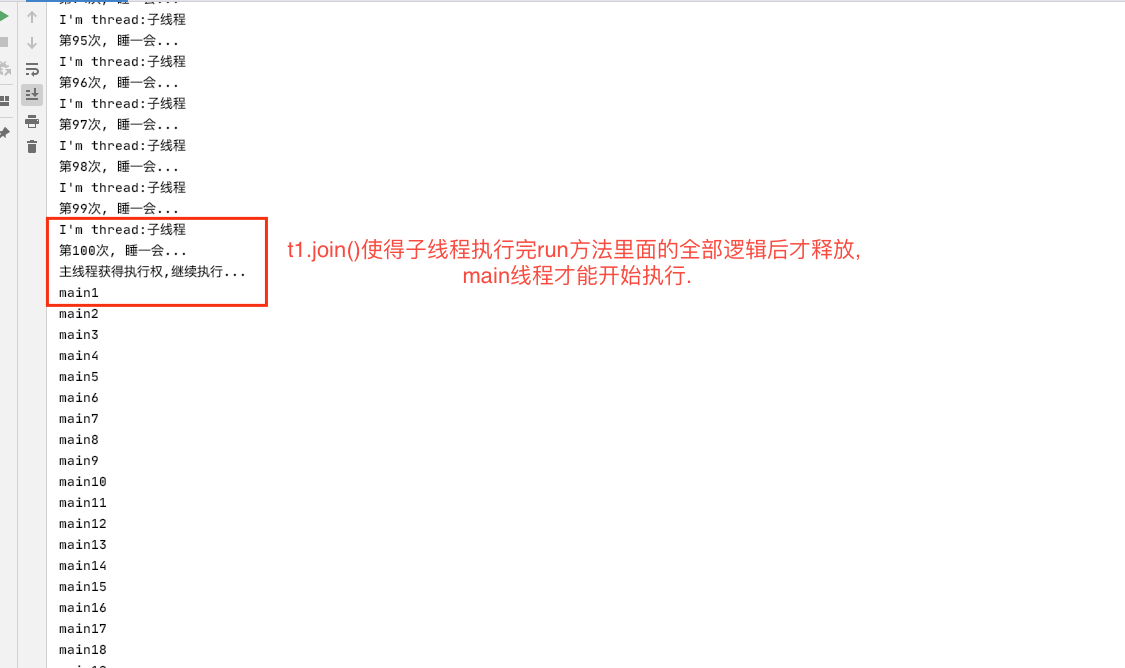
功能: 等待调用join方法的线程执行完, 才会释放,其他线程才能执行
效果图:
yield 1 2 3 4 5 6 7 8 9 10 11 12 13 14 15 16 17 18 19 20 21 22 23 24 package multiThreadDemos;public class Demo01 public static void main (String[] args) MyThread2 t1 = new MyThread2(); MyThread2 t2 = new MyThread2(); t1.start(); t2.start(); } static class MyThread2 extends Thread @Override public void run () for (int i = 1 ; i <= 100 ; i++) { System.out.println(getName()+", round:\t" +i); if (i % 10 == 0 ) { System.out.println("changeing to ...." ); yield(); } } } } }
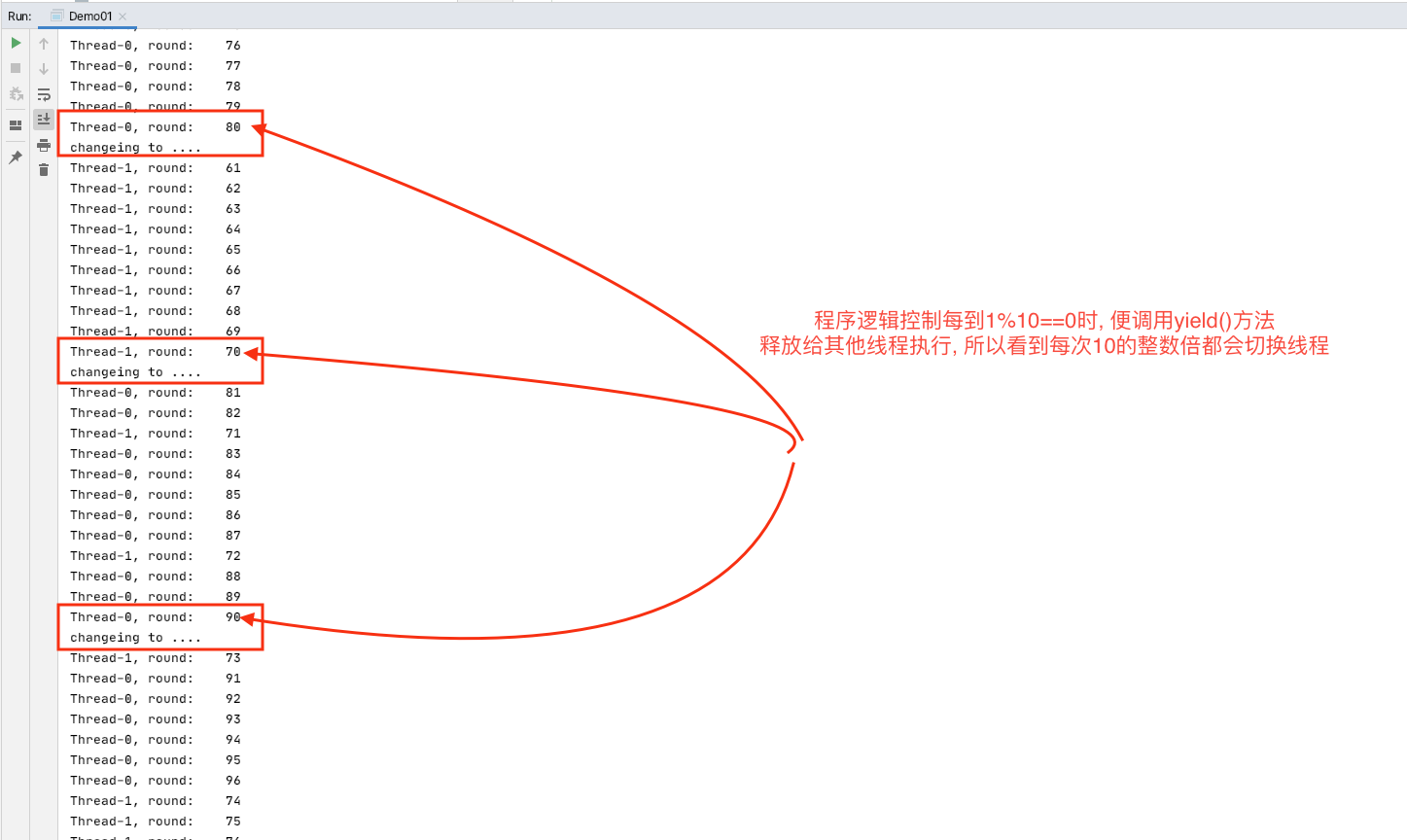
功能: 当前线程释放资源给其他线程执行, 只释放一次
效果图:
优先级设置 1 2 3 4 5 6 7 8 9 10 11 12 13 14 15 16 17 18 19 20 21 22 23 24 25 26 27 28 29 30 31 package multiThreadDemos;public class Demo01 public static void main (String[] args) Thread thread1 = new Thread(new T1()); Thread thread2 = new Thread(new T2()); thread1.setPriority(Thread.MAX_PRIORITY); thread1.start(); thread2.start(); } static class T1 implements Runnable @Override public void run () for (int i=1 ;i<=1000 ;i++){ System.out.println("--------T1:\t" +i); } } } static class T2 implements Runnable @Override public void run () for (int i=1 ;i<=1000 ;i++){ System.out.println("T2:\t" +i); } } } }
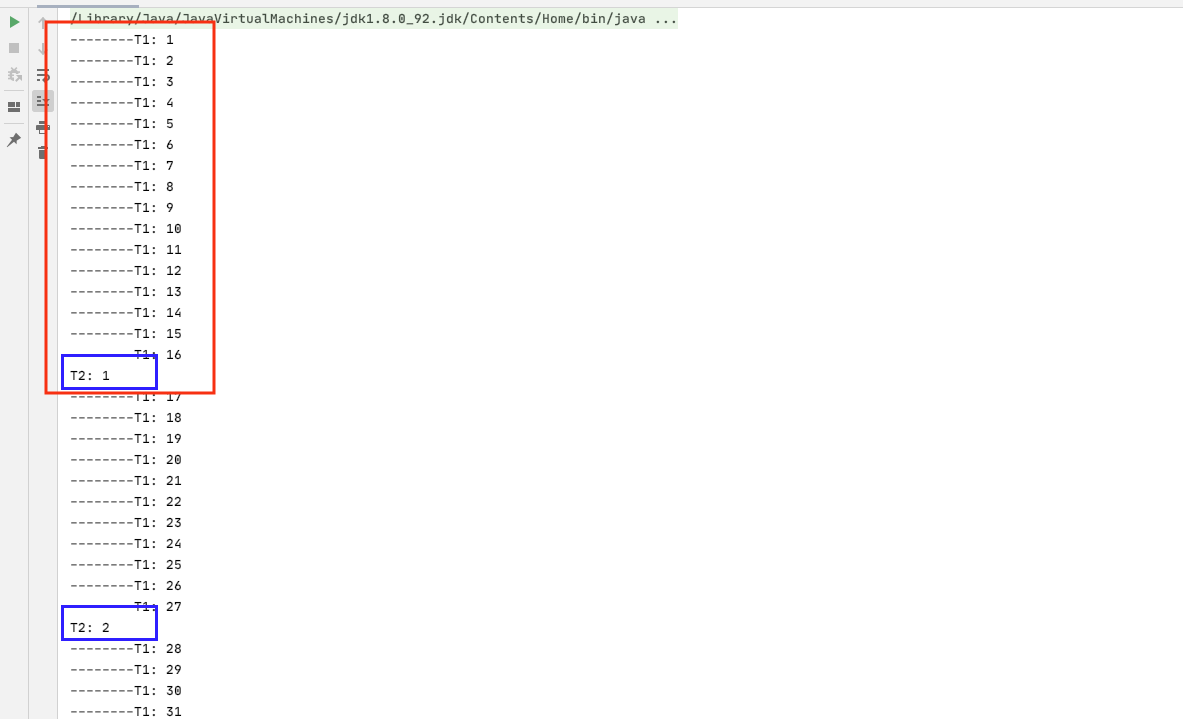
功能: 为某线程设置优先级系数, 系数越大, 获得执行的时间分片就越大, 持续执行的时间就越长.
效果图: (线程1执行到16才给线程2执行1次, 然后1再获取到执行执行权再执行到27才给2执行1次)
售票问题 多批票 代码:
1 2 3 4 5 6 7 8 9 10 11 12 13 14 15 16 17 18 19 20 21 22 23 24 25 package multiThreadDemos;public class Ticket extends Thread public int num=100 ; @Override public void run () while (true ){ if (num>0 ) { System.out.println(Thread.currentThread().getName() + "...saled ticket No:\t" + num--); } } } public static void main (String[] args) Ticket t1 = new Ticket(); Ticket t2 = new Ticket(); Ticket t3 = new Ticket(); Ticket t4 = new Ticket(); t1.start(); t2.start(); t3.start(); t4.start(); } }
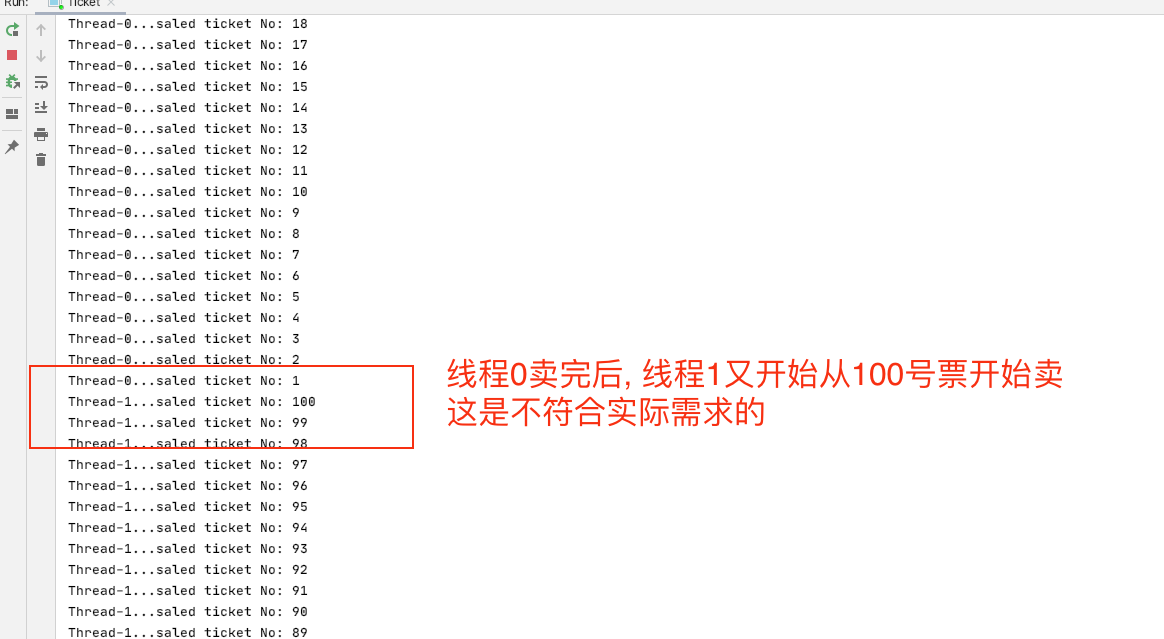
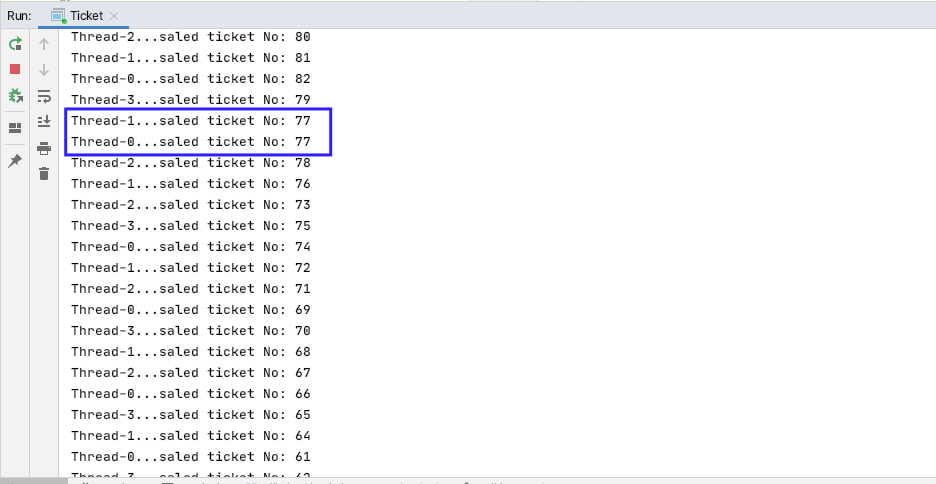
运行发现:
显然, 这种方式售票是不符合需求的, 因为 num 是Ticket的成员变量, 每次创建线程都会重新开辟空间, 分配一个新的地址来存储新的num并且存值100.
那么如何才能保证多个线程卖的是同样的100张票(而不是400张). 直观的想法是加上为num static关键字修饰, 使其为静态, 存在堆内存中,对象共享.
static 保证同一批 1 2 3 4 5 6 7 8 9 10 11 12 13 14 15 16 17 18 19 20 21 22 23 24 25 package multiThreadDemos;public class Ticket extends Thread public static int num=100 ; @Override public void run () while (true ){ if (num>0 ) { System.out.println(Thread.currentThread().getName() + "...saled ticket No:\t" + num--); } } } public static void main (String[] args) Ticket t1 = new Ticket(); Ticket t2 = new Ticket(); Ticket t3 = new Ticket(); Ticket t4 = new Ticket(); t1.start(); t2.start(); t3.start(); t4.start(); } }
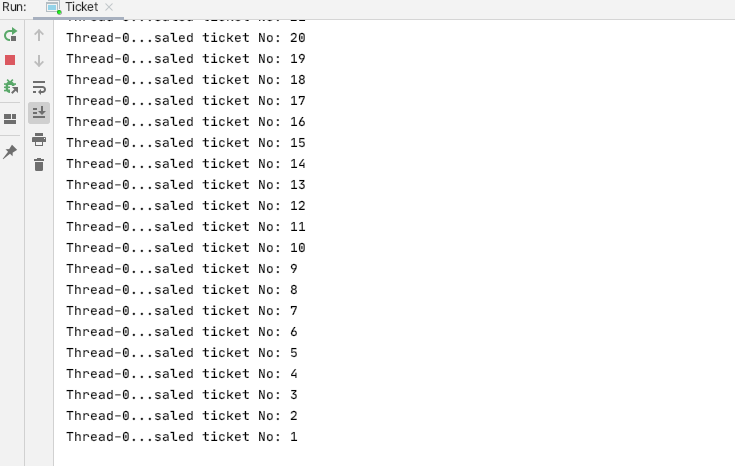
此时再次运行检查, 发现能够满足需求.
但是现实情况是有可能是某些售票点卖的票是有特殊要求的. 虽然总数还是100, 但是有可能某售票点A(对应线程1)专门负责出售80-100号头等舱票. 那么static的方式显然也是不合适的.
Runnable 封装票 所以最符合需求的实现方式应该是将票单独封装.(实现Runnable接口的方式)
1 2 3 4 5 6 7 8 9 10 11 12 13 14 15 16 17 18 19 20 21 22 23 24 25 26 27 28 29 30 31 package multiThreadDemos;public class Ticket implements Runnable public int num = 100 ; @Override public void run () while (true ) { if (num > 0 ) { try { Thread.sleep(100 ); } catch (InterruptedException e) { e.printStackTrace(); } System.out.println(Thread.currentThread().getName() + "...saled ticket No:\t" + num--); } } } public static void main (String[] args) Ticket t = new Ticket(); Thread t1 = new Thread(t); Thread t2 = new Thread(t); Thread t3 = new Thread(t); Thread t4 = new Thread(t); t1.start(); t2.start(); t3.start(); t4.start(); } }
此时再运行发现: 同一张票被卖了多次的情况又发生了.
同步synchronized方法(run上) 为了解决上面的问题, 我们将买票的操作进行加锁同步化. 很直观的想法就是在run方法上加锁
1 2 3 4 5 6 7 8 9 10 11 12 13 14 15 16 17 18 19 20 21 22 23 24 25 26 27 28 29 30 31 package multiThreadDemos;public class Ticket implements Runnable public int num = 100 ; @Override public synchronized void run () while (true ) { if (num > 0 ) { try { Thread.sleep(100 ); } catch (InterruptedException e) { e.printStackTrace(); } System.out.println(Thread.currentThread().getName() + "...saled ticket No:\t" + num--); } } } public static void main (String[] args) Ticket t = new Ticket(); Thread t1 = new Thread(t); Thread t2 = new Thread(t); Thread t3 = new Thread(t); Thread t4 = new Thread(t); t1.start(); t2.start(); t3.start(); t4.start(); } }
然而, 在run()方法上同步synchronized并不能解决问题, 因为while(true)也被同步了, 即使线程0 sleep释放了执行权, 其他线程也得不到执行权, 进不来. 因为synchronized是加在run()方法上的, 所以只有当run()方法执行完之后其他线程才有机会获得执行权. 但是, 因为while(true)的存在, 线程0 永远都不会执行完run()方法.
同步synchronized代码块 回头再分析Runnable单独封装的方法, 发现同一张票被卖了多次的情况的原因是, 卖票的动作非一行代码(不具备原子性), 所以, synchronized关键字加载需要具备原子性的业务代码上, 所以如下修改代码:
1 2 3 4 5 6 7 8 9 10 11 12 13 14 15 16 17 18 19 20 21 22 23 24 25 26 27 28 29 30 31 32 33 34 package multiThreadDemos;public class Ticket implements Runnable public int num = 100 ; @Override public void run () while (true ) { synchronized (this ){ if (num > 0 ) { try { Thread.sleep(100 ); } catch (InterruptedException e) { e.printStackTrace(); } System.out.println(Thread.currentThread().getName() + "...saled ticket No:\t" + num--); } } } } public static void main (String[] args) Ticket t = new Ticket(); Thread t1 = new Thread(t); Thread t2 = new Thread(t); Thread t3 = new Thread(t); Thread t4 = new Thread(t); t1.start(); t2.start(); t3.start(); t4.start(); } }
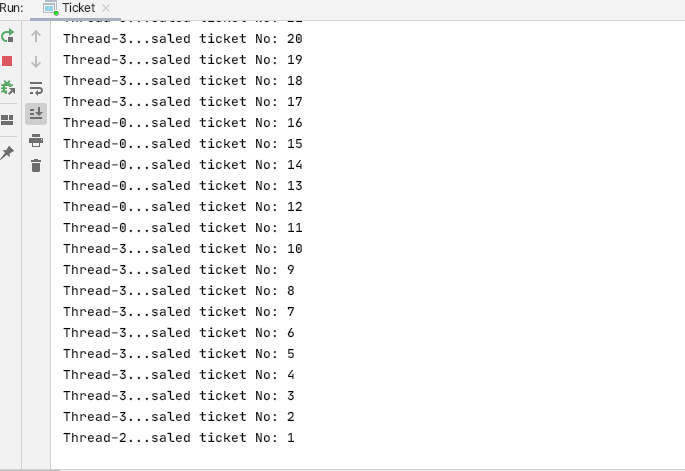
此时, 再次运行, 发现一切正常, 完全满足需求. (既没有卖0,-1这种票的, 也没有同一张票被卖了多次的情况)
同步synchronized方法(单独封装) 其实, 更好的一种方法是将synchronized同步代码块中的动作单独封装成方法同步方法, 然后在 run()中调用该方法
1 2 3 4 5 6 7 8 9 10 11 12 13 14 15 16 17 18 19 20 21 22 23 24 25 26 27 28 29 30 31 32 33 34 35 package multiThreadDemos;public class Ticket implements Runnable public int num = 100 ; @Override public void run () while (true ) { sale(); } } public synchronized void sale () if (num > 0 ) { try { Thread.sleep(100 ); } catch (InterruptedException e) { e.printStackTrace(); } System.out.println(Thread.currentThread().getName() + "...saled ticket No:\t" + num--); } } public static void main (String[] args) Ticket t = new Ticket(); Thread t1 = new Thread(t); Thread t2 = new Thread(t); Thread t3 = new Thread(t); Thread t4 = new Thread(t); t1.start(); t2.start(); t3.start(); t4.start(); } }
总结 1 2 3 4 5 6 7 8 9 10 11 12 13 14 15 16 17 18 19 20 21 22 23 24 25 26 27
单例设计模式线程安全问题 1 2 3 4 5 6 7 8 9 10 11 12 13 14 15 16 17 18 19 20 21 22 23 24 25 26 27 28 29 30 31 32 33 34 35 36 37 38 39 40 41 42 43 44 45 46 47 48 49 50 51 52 53 54 55 56 57 58 59 60 61 62 63 64 65 66 package multiThreadDemos;public class SingleDemo public static void main (String[] args) } } class Single1 private static final Single1 s = new Single1(); private Single1 () } public static Single1 getInstance () return s; } } class Single2 private static Single2 s = null ; private Single2 () } public static Single2 getInstance () if (s == null ) { return new Single2(); } else { return s; } } } class Single3 private static Single3 s = null ; private Single3 () } public static synchronized Single3 getInstance () if (s == null ) { return new Single3(); } else { return s; } } } class Single4 private static Single4 s = null ; private Single4 () } public static Single4 getInstance () if (s==null ){ synchronized (Single4.class ) { if (s == null ) { return new Single4(); } } } return s; } }
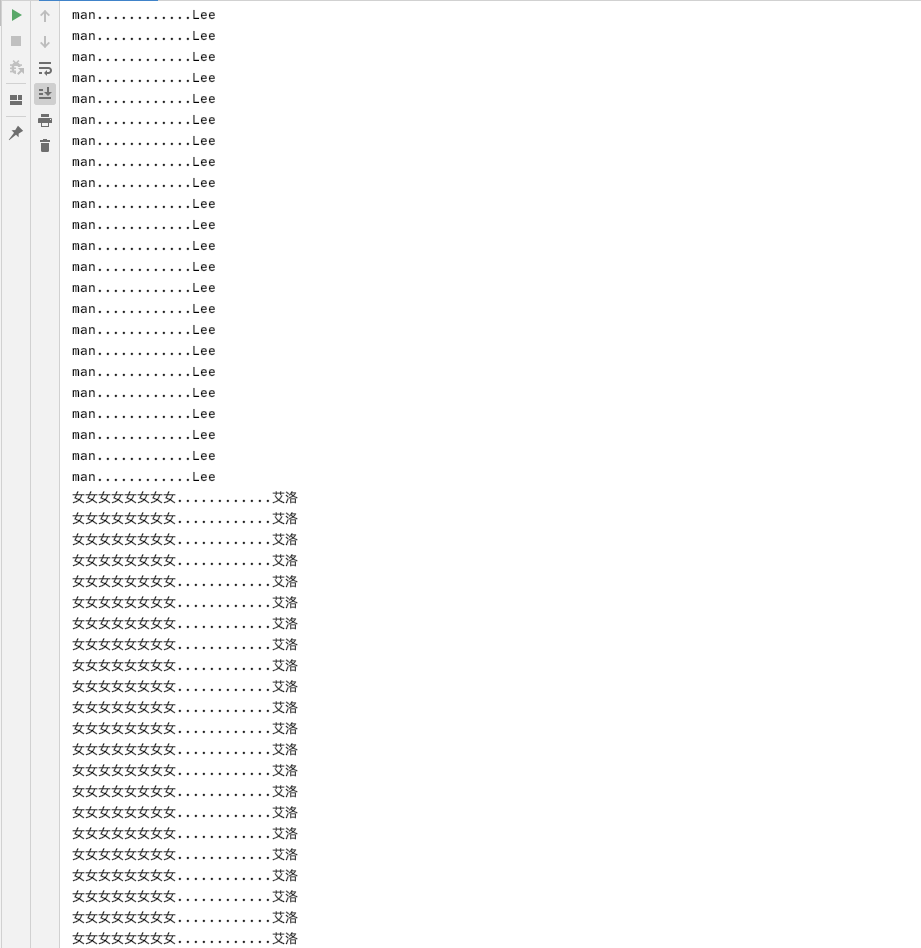
线程间通信的同步问题 问题 1 2 3 4 5 6 7 8 9 10 11 12 13 14 15 16 17 18 19 20 21 22 23 24 25 26 27 28 29 30 31 32 33 34 35 36 37 38 39 40 41 42 43 44 45 46 47 48 49 50 51 52 53 package multiThreadDemos;public class InterThread public static void main (String[] args) Resource r=new Resource(); In in = new In(r); Out out = new Out(r); Thread t1 = new Thread(in); Thread t2 = new Thread(out); t1.start(); t2.start(); } } class Resource String name; String sex; } class In implements Runnable Resource r; In(Resource r){ this .r=r; } @Override public void run () int flag=0 ; while (true ){ if (flag%2 ==0 ){ r.name="Lee" ; r.sex="man" ; }else { r.name="艾洛" ; r.sex="女女女女女女女女" ; } ++flag; } } } class Out implements Runnable Resource r; Out(Resource r){ this .r=r; } @Override public void run () while (true ){ System.out.println(r.sex+"............" +r.name); } } }
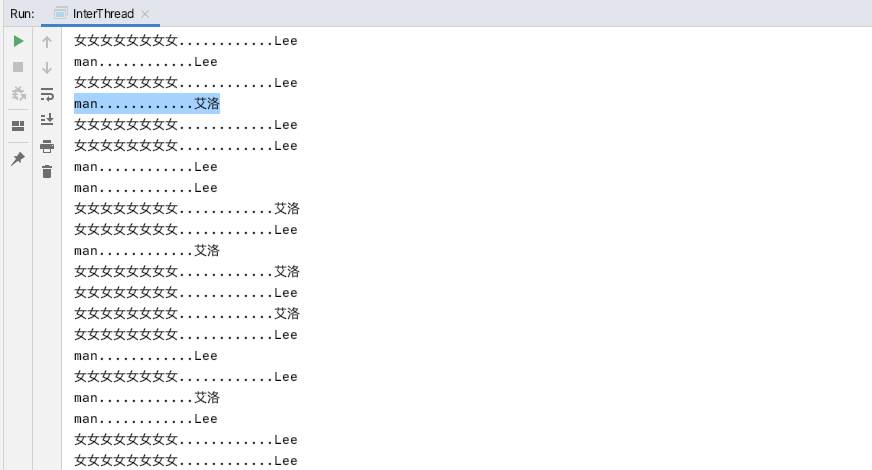
执行上述代码发现线程不安全:
为了解决上面的问题, 所以把run方法里面的操作工资资源数据的逻辑代码进行同步化, 并且保证同步化的锁是同一把锁🔐.
1 2 3 4 5 6 7 8 9 10 11 12 13 14 15 16 17 18 19 20 21 22 23 24 25 26 27 28 29 30 31 32 33 34 35 36 37 38 39 40 41 42 43 44 45 46 47 48 49 50 51 52 53 54 55 56 57 58 59 60 61 package multiThreadDemos;public class InterThread public static void main (String[] args) Resource r = new Resource(); In in = new In(r); Out out = new Out(r); Thread t1 = new Thread(in); Thread t2 = new Thread(out); t1.start(); t2.start(); } } class Resource String name; String sex; } class In implements Runnable Resource r; In(Resource r) { this .r = r; } @Override public void run () int flag = 0 ; while (true ) { synchronized (r) { if (flag % 2 == 0 ) { r.name = "Lee" ; r.sex = "man" ; } else { r.name = "艾洛" ; r.sex = "女女女女女女女女" ; } } ++flag; } } } class Out implements Runnable Resource r; Out(Resource r) { this .r = r; } @Override public void run () while (true ) { synchronized (r) { System.out.println(r.sex + "............" + r.name); } } } }
解决方案 但是如果我们的需求是男女输出是依次交替进行的, 而不是一批一批的.应该怎么办呢? 这就引出了等待唤醒机制 , 即wait-notify
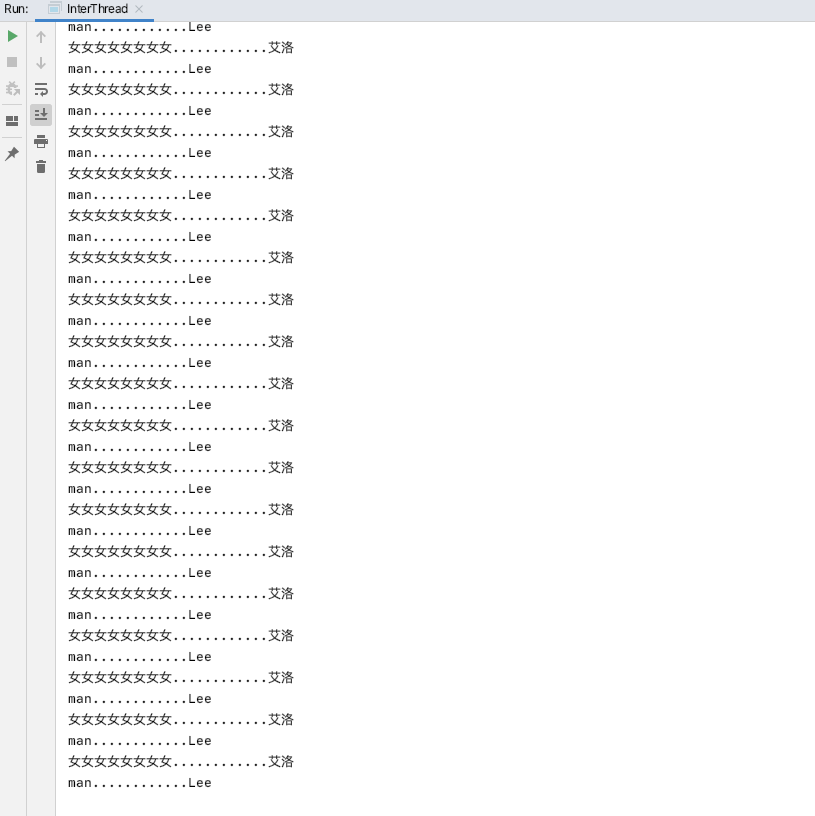
1 2 3 4 5 6 7 8 9 10 11 12 13 14 15 16 17 18 19 20 21 22 23 24 25 26 27 28 29 30 31 32 33 34 35 36 37 38 39 40 41 42 43 44 45 46 47 48 49 50 51 52 53 54 55 56 57 58 59 60 61 62 63 64 65 66 67 68 69 70 71 72 73 74 75 76 77 78 79 80 81 82 83 package multiThreadDemos; public class InterThread public static void main (String[] args) Resource r = new Resource(); In in = new In(r); Out out = new Out(r); Thread t1 = new Thread(in); Thread t2 = new Thread(out); t1.start(); t2.start(); } } class Resource String name; String sex; boolean isWait=false ; } class In implements Runnable Resource r; In(Resource r) { this .r = r; } @Override public void run () int flag = 0 ; while (true ) { synchronized (r) { if (r.isWait) { try { r.wait(); } catch (InterruptedException e) { e.printStackTrace(); } } if (flag % 2 == 0 ) { r.name = "Lee" ; r.sex = "man" ; } else { r.name = "艾洛" ; r.sex = "女女女女女女女女" ; } r.isWait = true ; r.notify(); } ++flag; } } } class Out implements Runnable Resource r; Out(Resource r) { this .r = r; } @Override public void run () while (true ) { synchronized (r) { if (!r.isWait) { try { r.wait(); } catch (InterruptedException e) { e.printStackTrace(); } } System.out.println(r.sex + "............" + r.name); r.isWait = false ; r.notify(); } } } }
执行上述代码可以看到能满足我们交替输出男女的需求.
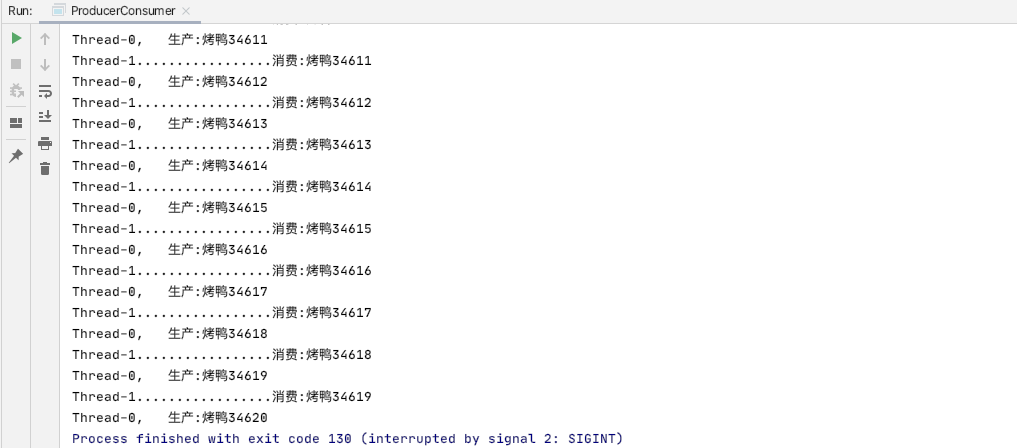
总结 生产者-消费者 单个生产者-消费者 1 2 3 4 5 6 7 8 9 10 11 12 13 14 15 16 17 18 19 20 21 22 23 24 25 26 27 28 29 30 31 32 33 34 35 36 37 38 39 40 41 42 43 44 45 46 47 48 49 50 51 52 53 54 55 56 57 58 59 60 61 62 63 64 65 66 67 68 69 70 71 72 73 74 75 76 77 78 79 80 81 82 83 84 85 86 87 88 89 90 91 92 93 94 95 96 97 98 99 100 101 102 103 104 105 106 107 108 109 110 111 package multiThreadDemos;public class ProducerConsumer public static void main (String[] args) Resource r = new Resource("烤鸭" ); Producer p = new Producer(r); Consumer c = new Consumer(r); Thread t0 = new Thread(p); Thread t1 = new Thread(c); t0.start(); t1.start(); } } class Resource private String name; private int count = 0 ; private boolean isWait = false ; public Resource (String name) this .name = name; } synchronized void produde () if (isWait) { try { this .wait(); } catch (InterruptedException e) { e.printStackTrace(); } } setCount(getCount() + 1 ); System.out.println(Thread.currentThread().getName() + ",\t生产:" + getName() + getCount()); setWait(true ); notify(); } synchronized void consume () if (!isWait) { try { this .wait(); } catch (InterruptedException e) { e.printStackTrace(); } } System.out.println(Thread.currentThread().getName() + ".................消费:" + getName() + getCount()); setWait(false ); notify(); } public String getName () return name; } public void setName (String name) this .name = name; } public int getCount () return count; } public void setCount (int count) this .count = count; } public boolean isWait () return isWait; } public void setWait (boolean wait) isWait = wait; } } class Producer implements Runnable Resource r; Producer(Resource r) { this .r = r; } ; @Override public void run () while (true ){ r.produde(); } } } class Consumer implements Runnable Resource r; Consumer(Resource r) { this .r = r; } ; @Override public void run () while (true ){ r.consume(); } } }
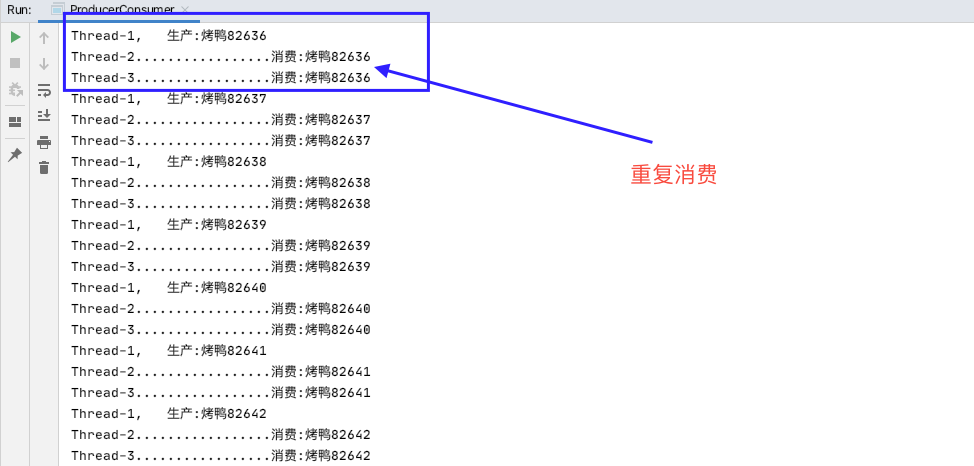
多个生产者消费者(问题1) 1 2 3 4 5 6 7 8 9 10 11 12 13 14 15 16 17 18 19 20 21 22 23 24 25 26 27 28 29 30 31 32 33 34 35 36 37 38 39 40 41 42 43 44 45 46 47 48 49 50 51 52 53 54 55 56 57 58 59 60 61 62 63 64 65 66 67 68 69 70 71 72 73 74 75 76 77 78 79 80 81 82 83 84 85 86 87 88 89 90 91 92 93 94 95 96 97 98 99 100 101 102 103 104 105 106 107 108 109 110 111 112 113 114 115 package multiThreadDemos;public class ProducerConsumer public static void main (String[] args) Resource r = new Resource("烤鸭" ); Producer p = new Producer(r); Consumer c = new Consumer(r); Thread t0 = new Thread(p); Thread t1 = new Thread(p); Thread t2 = new Thread(c); Thread t3 = new Thread(c); t0.start(); t1.start(); t2.start(); t3.start(); } } class Resource private String name; private int count = 0 ; private boolean isWait = false ; public Resource (String name) this .name = name; } synchronized void produde () if (isWait) { try { this .wait(); } catch (InterruptedException e) { e.printStackTrace(); } } setCount(getCount() + 1 ); System.out.println(Thread.currentThread().getName() + ",\t生产:" + getName() + getCount()); setWait(true ); notify(); } synchronized void consume () if (!isWait) { try { this .wait(); } catch (InterruptedException e) { e.printStackTrace(); } } System.out.println(Thread.currentThread().getName() + ".................消费:" + getName() + getCount()); setWait(false ); notify(); } public String getName () return name; } public void setName (String name) this .name = name; } public int getCount () return count; } public void setCount (int count) this .count = count; } public boolean isWait () return isWait; } public void setWait (boolean wait) isWait = wait; } } class Producer implements Runnable Resource r; Producer(Resource r) { this .r = r; } ; @Override public void run () while (true ){ r.produde(); } } } class Consumer implements Runnable Resource r; Consumer(Resource r) { this .r = r; } ; @Override public void run () while (true ){ r.consume(); } } }
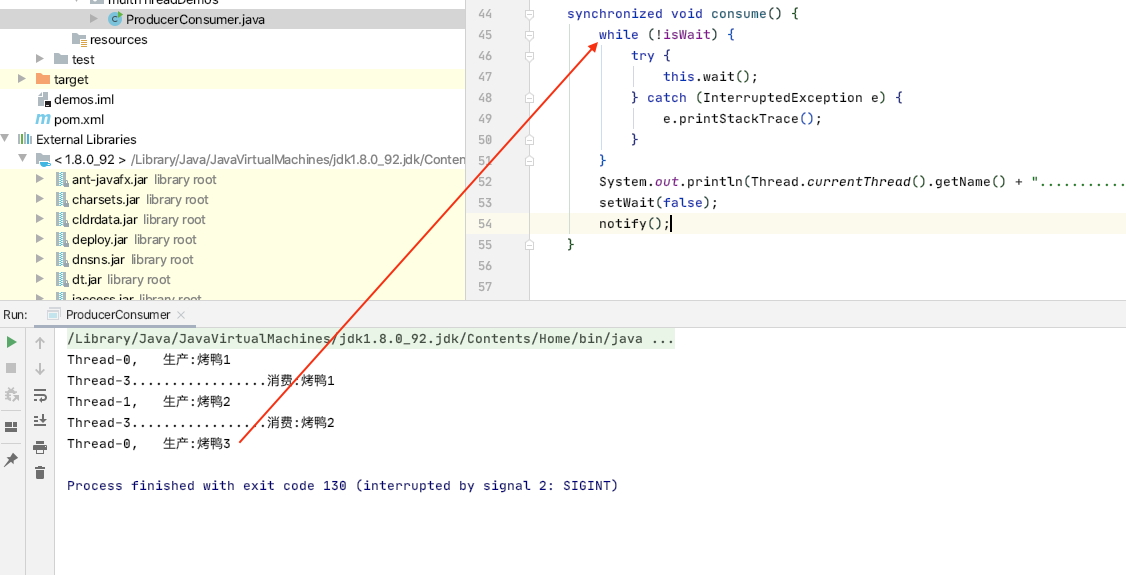
产生该问题的原因是, notify()方法每次只唤醒的线程池中的一个线程, (t0,t1生产者线程, t2,t3消费者线程). 假如某一时刻, 只有t3拥有执行权, 执行完后notify, 唤醒的是t2, 而此时if(isWait) 不会重复判断标记. 那么就出现了重复消费, 同理, 也可能出现重复生产.
那么该怎么解决呢?
多个生产者消费者(问题2) 可能有人会想到, 不用if, 而是改用while(isWait)来判断标记, 保证每个被唤醒的线程都会重复判断标记.
1 2 3 4 5 6 7 8 9 10 11 12 13 14 15 16 17 18 19 20 21 22 23 24 25 26 27 28 29 30 31 32 33 34 35 36 37 38 39 40 41 42 43 44 45 46 47 48 49 50 51 52 53 54 55 56 57 58 59 60 61 62 63 64 65 66 67 68 69 70 71 72 73 74 75 76 77 78 79 80 81 82 83 84 85 86 87 88 89 90 91 92 93 94 95 96 97 98 99 100 101 102 103 104 105 106 107 108 109 110 111 112 113 114 115 package multiThreadDemos;public class ProducerConsumer public static void main (String[] args) Resource r = new Resource("烤鸭" ); Producer p = new Producer(r); Consumer c = new Consumer(r); Thread t0 = new Thread(p); Thread t1 = new Thread(p); Thread t2 = new Thread(c); Thread t3 = new Thread(c); t0.start(); t1.start(); t2.start(); t3.start(); } } class Resource private String name; private int count = 0 ; private boolean isWait = false ; public Resource (String name) this .name = name; } synchronized void produde () while (isWait) { try { this .wait(); } catch (InterruptedException e) { e.printStackTrace(); } } setCount(getCount() + 1 ); System.out.println(Thread.currentThread().getName() + ",\t生产:" + getName() + getCount()); setWait(true ); notify(); } synchronized void consume () while (!isWait) { try { this .wait(); } catch (InterruptedException e) { e.printStackTrace(); } } System.out.println(Thread.currentThread().getName() + ".................消费:" + getName() + getCount()); setWait(false ); notify(); } public String getName () return name; } public void setName (String name) this .name = name; } public int getCount () return count; } public void setCount (int count) this .count = count; } public boolean isWait () return isWait; } public void setWait (boolean wait) isWait = wait; } } class Producer implements Runnable Resource r; Producer(Resource r) { this .r = r; } ; @Override public void run () while (true ){ r.produde(); } } } class Consumer implements Runnable Resource r; Consumer(Resource r) { this .r = r; } ; @Override public void run () while (true ){ r.consume(); } } }
这样的话又会产生另外一个问题:
(t0,t1生产者线程, t2,t3消费者线程) 假如某一时刻, 当 t0,t1,t2都wait状态, 此时, t3获取到执行权后, 执行完, 将标记置为false, 然后唤醒线程池中的线程, 如果不幸唤醒的是t2, 那么t2再次判断while(!isWait), 就会导致4个线程都会wait. 形成死锁. 如下图
多个生产者消费者(解决sync-while-notifyAll) 那么难道没有办法解决多生产者消费者的问题了吗? 当然不是.
总结
上面出现问题的原因, 只要同事满足两点即可解决问题:
1. 等代标记必须每次都判断 (while代替if)
2. 每次唤醒必须有对方(消费-生产互为对方)线程. (notifyAll()确保一定会唤醒对方线程)1 2 3 4 5 6 7 8 9 10 11 12 13 14 15 16 17 18 19 20 21 22 23 24 25 26 27 28 29 30 31 32 33 34 35 36 37 38 39 40 41 42 43 44 45 46 47 48 49 50 51 52 53 54 55 56 57 58 59 60 61 62 63 64 65 66 67 68 69 70 71 72 73 74 75 76 77 78 79 80 81 82 83 84 85 86 87 88 89 90 91 92 93 94 95 96 97 98 99 100 101 102 103 104 105 106 107 108 109 110 111 112 113 114 115 package multiThreadDemos;public class ProducerConsumer public static void main (String[] args) Resource r = new Resource("烤鸭" ); Producer p = new Producer(r); Consumer c = new Consumer(r); Thread t0 = new Thread(p); Thread t1 = new Thread(p); Thread t2 = new Thread(c); Thread t3 = new Thread(c); t0.start(); t1.start(); t2.start(); t3.start(); } } class Resource private String name; private int count = 0 ; private boolean isWait = false ; public Resource (String name) this .name = name; } synchronized void produde () while (isWait) { try { this .wait(); } catch (InterruptedException e) { e.printStackTrace(); } } setCount(getCount() + 1 ); System.out.println(Thread.currentThread().getName() + ",\t生产:" + getName() + getCount()); setWait(true ); notifyAll(); } synchronized void consume () while (!isWait) { try { this .wait(); } catch (InterruptedException e) { e.printStackTrace(); } } System.out.println(Thread.currentThread().getName() + ".................消费:" + getName() + getCount()); setWait(false ); notifyAll(); } public String getName () return name; } public void setName (String name) this .name = name; } public int getCount () return count; } public void setCount (int count) this .count = count; } public boolean isWait () return isWait; } public void setWait (boolean wait) isWait = wait; } } class Producer implements Runnable Resource r; Producer(Resource r) { this .r = r; } ; @Override public void run () while (true ){ r.produde(); } } } class Consumer implements Runnable Resource r; Consumer(Resource r) { this .r = r; } ; @Override public void run () while (true ){ r.consume(); } } }
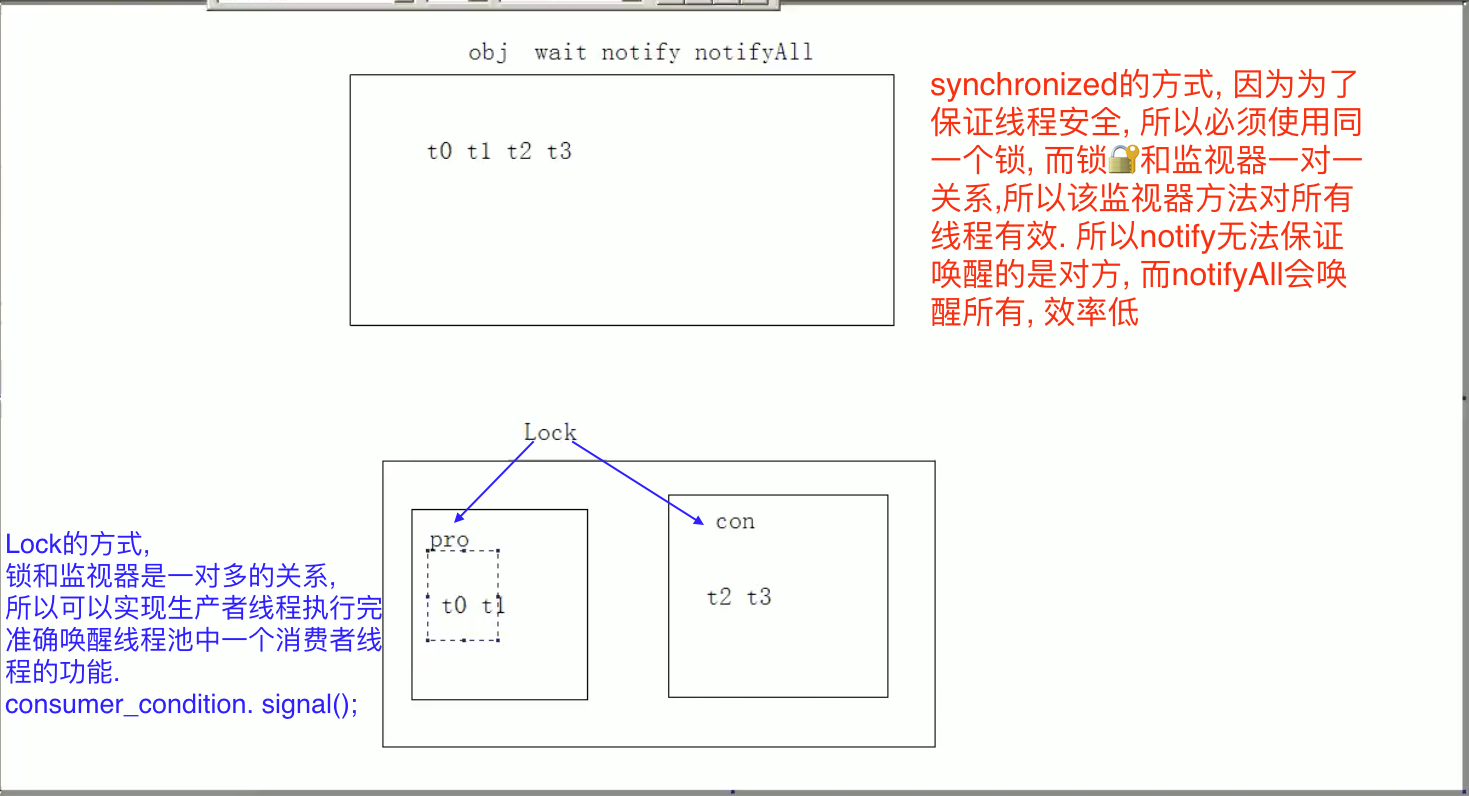
多个生产者消费者(解决lock-condition–signal) 用上面的synchronized-while-notifyAll的方法虽然能解决问题, 但是每次都是线程所有线程池中的所有线程(比如t0执行完唤醒线程池中的t1,t2,t3), t1,t2,t3重新获取执行资格, 但是只有其中一个会立刻获取执行权, 不妨是t2, 那么因为是while判断, 所以t2又要重新判断等待标记. 显然, 这样做效率会有降低.
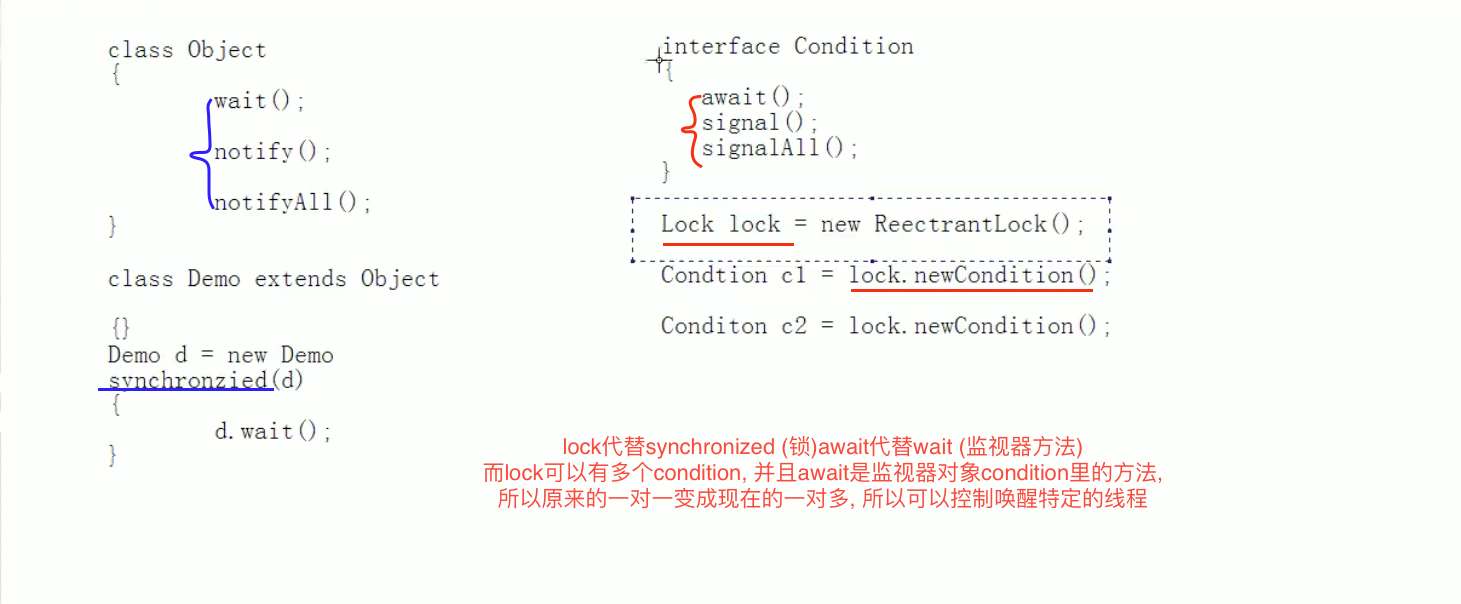
JDK5之后, 将锁对象进行了封装, 将原来隐式的synchronized锁和其配套的监视器对象方法(wait-notify-notifyAll)进行了封装, 使其显示化, 并且不再是一个锁对象对应一组监视器方法, 而是可以一个锁对应多组监视器方法.
具体的可以参见Java SE API 下的java.utils.concurrent.locks包下的lock和condition对象方法.
condition类的描述中有一句:
1 **Where a `Lock` replaces the use of `synchronized` methods and statements, a `Condition` replaces the use of the Object monitor methods.**
翻译过来也就是说, (可以用下面的图表示):
synchronized和lock对比
官网提供了一段代码使用示例:
1 2 3 4 5 6 7 8 9 10 11 12 13 14 15 16 17 18 19 20 21 22 23 24 25 26 27 28 29 30 31 32 33 34 35 36 37 38 39 40 41 class BoundedBuffer final Lock lock = new ReentrantLock(); final Condition notFull = lock.newCondition(); final Condition notEmpty = lock.newCondition(); final Object[] items = new Object[100 ]; int putptr, takeptr, count; public void put (Object x) throws InterruptedException lock.lock(); try { while (count == items.length) notFull.await(); items[putptr] = x; if (++putptr == items.length) putptr = 0 ; ++count; notEmpty.signal(); } finally { lock.unlock(); } } public Object take () throws InterruptedException lock.lock(); try { while (count == 0 ) notEmpty.await(); Object x = items[takeptr]; if (++takeptr == items.length) takeptr = 0 ; --count; notFull.signal(); return x; } finally { lock.unlock(); } } }
所以lock-condition-signal方式解决代码如下:
1 2 3 4 5 6 7 8 9 10 11 12 13 14 15 16 17 18 19 20 21 22 23 24 25 26 27 28 29 30 31 32 33 34 35 36 37 38 39 40 41 42 43 44 45 46 47 48 49 50 51 52 53 54 55 56 57 58 59 60 61 62 63 64 65 66 67 68 69 70 71 72 73 74 75 76 77 78 79 80 81 82 83 84 85 86 87 88 89 90 91 92 93 94 95 96 97 98 99 100 101 102 103 104 105 106 107 108 109 110 111 112 113 114 115 116 117 118 119 120 121 122 123 124 125 package multiThreadDemos;import java.util.concurrent.locks.Condition;import java.util.concurrent.locks.Lock;import java.util.concurrent.locks.ReentrantLock;public class ProducerConsumer public static void main (String[] args) Resource r = new Resource("烤鸭" ); Producer p = new Producer(r); Consumer c = new Consumer(r); Thread t0 = new Thread(p); Thread t1 = new Thread(p); Thread t2 = new Thread(c); Thread t3 = new Thread(c); t0.start(); t1.start(); t2.start(); t3.start(); } } class Resource private String name; private int count = 0 ; private boolean isWait = false ; private Lock lock = new ReentrantLock(); Condition c1 = lock.newCondition(); Condition c2 = lock.newCondition(); public Resource (String name) this .name = name; } void produce () lock.lock(); try { while (isWait) { try { c1.await(); } catch (InterruptedException e) { e.printStackTrace(); } } setCount(getCount() + 1 ); System.out.println(Thread.currentThread().getName() + ",\t生产:" + getName() + getCount()); setWait(true ); c2.signal(); } finally { lock.unlock(); } } void consume () lock.lock(); try { while (!isWait) { try { c2.await(); } catch (InterruptedException e) { e.printStackTrace(); } } System.out.println(Thread.currentThread().getName() + ".................消费:" + getName() + getCount()); setWait(false ); c1.signal(); }finally { lock.unlock(); } } public String getName () return name; } public void setName (String name) this .name = name; } public int getCount () return count; } public void setCount (int count) this .count = count; } public boolean isWait () return isWait; } public void setWait (boolean wait) isWait = wait; } } class Producer implements Runnable Resource r; Producer(Resource r) { this .r = r; } ; @Override public void run () while (true ){ r.produce(); } } } class Consumer implements Runnable Resource r; Consumer(Resource r) { this .r = r; } ; @Override public void run () while (true ){ r.consume(); } } }
wait和sleep区别
–
wait
1. 归属
Thread静态方法
Object方法
2. 时间
必须指定
可指定也可不指定
3. 锁
不释放
释放
4. 作用范围
任何地方
同步方法或同步代码块
正确停止线程的方法 1 2 3 4 5 6 7 8 9 10 11 12 13 14 15 16 17 18 19 20 21 22 23 24 25 26 27 28 package multiThreadDemos;public class Demo01 public static void main (String[] args) throws InterruptedException T1 t1 = new T1(); Thread thread = new Thread(t1); thread.start(); t1.shutdown(); } static class T1 implements Runnable private boolean continueFlag=true ; @Override public void run () int i=1 ; while (continueFlag){ System.out.println("T1:\t" +i++); } } public void shutdown () continueFlag=false ; } } }
run()执行结束, 线程就结束, 也就停止了, 所以正确的停止线程的方法就是想办法让run()执行完业务逻辑后, 自然停止.
interrupt停止线程 interrupt()是另一种停止线程的方式 (不推荐)
1 2 3 4 5 6 7 8 9 10 11 12 13 14 15 16 17 18 19 20 21 22 23 24 25 26 27 28 29 30 31 32 33 34 35 36 37 38 39 40 41 42 43 44 package multiThreadDemos;public class StopThreadWithInterrupt public static void main (String[] args) InterruptStop is = new InterruptStop(); Thread t1 = new Thread(is); Thread t2 = new Thread(is); t1.start(); t2.start(); int num = 0 ; for (; ; ) { if (++num == 50 ) { t1.interrupt(); t2.interrupt(); break ; } System.out.println("...........main\t" + num); } System.out.println("over!" ); } } class InterruptStop implements Runnable private boolean flag = true ; public void setFlag () flag = false ; } @Override public synchronized void run () while (flag) { try { wait(); } catch (InterruptedException e) { flag = false ; System.out.println(Thread.currentThread().getName() + e.getMessage()); } System.out.println(Thread.currentThread().getName() + "...继续执行" ); } } }
有可能多个线程在此处都释放资源等待被唤醒, 但是没有notify()方法将其唤醒, 所以也会死锁, 一直等待下去, 因此, 在main线程中做一个标记, 当执行到多少回时, 调用线程的interrupt() 方法将线程唤醒, 然后将标记置为false, 然后while(flag)不成立, 所以run方法结束, 线程也就结束.
守护线程Daemon 守护线程也叫后台线程. 非后台线程(一般线程)也叫前台线程. 启动线程前调用setDaemon()方法可以将线程设置为守护线程. 当正在运行的线程都是守护线程时(也就是前台线程全部运行完结束了), 那么JVM会退出.
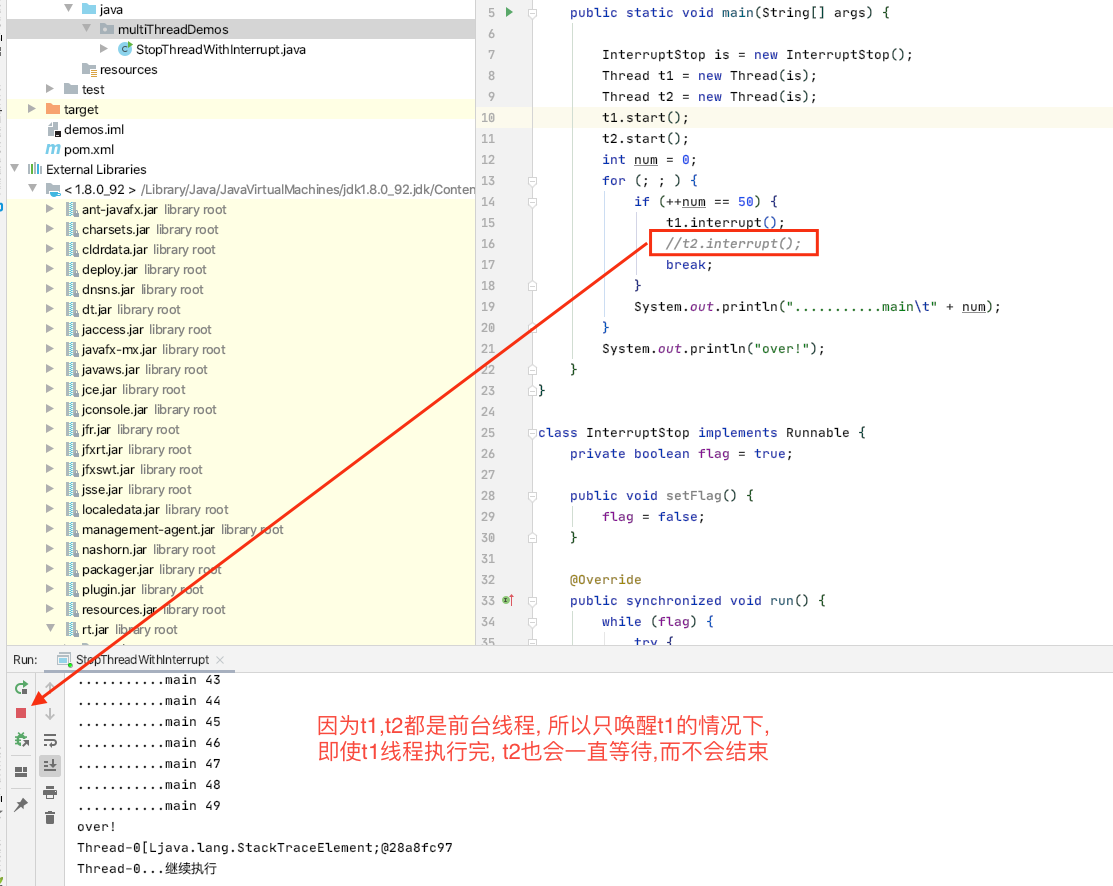
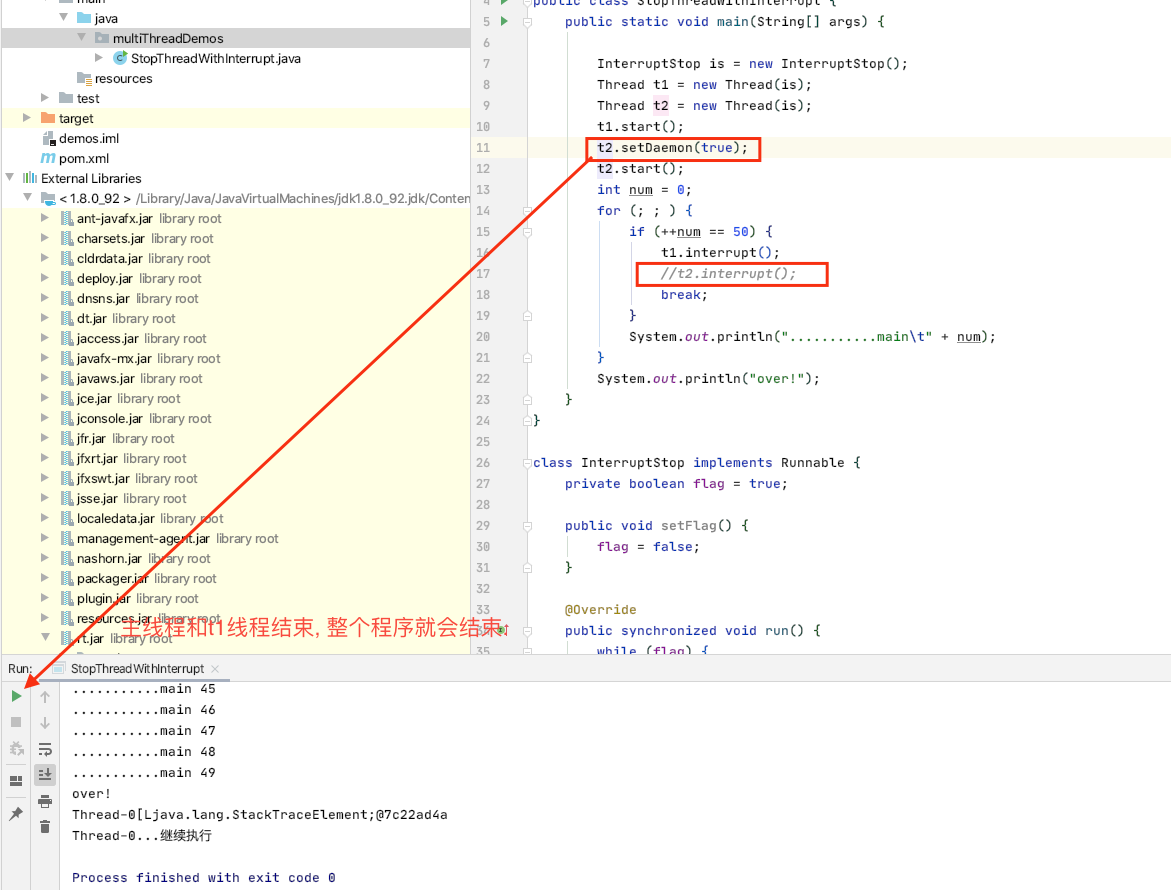
如果将 interrupt停止线程 部分的代码的main方法中改为只interrupt t1线程, 那么运行程序将一直进行, 永远不会停止, 因为t2一直处于wait状态, 但是, 如果在此基础上再在t2线程启动前,将其设置为守护线程,那么t1线程和主线程执行完,整个程序就会停止.
1 2 3 4 5 6 7 8 9 10 11 12 13 14 15 16 17 18 19 20 21 22 23 24 25 26 27 28 29 30 31 32 33 34 35 36 37 38 39 40 41 42 43 44 45 package multiThreadDemos;public class StopThreadWithInterrupt public static void main (String[] args) InterruptStop is = new InterruptStop(); Thread t1 = new Thread(is); Thread t2 = new Thread(is); t1.start(); t2.setDaemon(true ); t2.start(); int num = 0 ; for (; ; ) { if (++num == 50 ) { t1.interrupt(); break ; } System.out.println("...........main\t" + num); } System.out.println("over!" ); } } class InterruptStop implements Runnable private boolean flag = true ; public void setFlag () flag = false ; } @Override public synchronized void run () while (flag) { try { wait(); } catch (InterruptedException e) { flag = false ; System.out.println(Thread.currentThread().getName() + e.getStackTrace()); } System.out.println(Thread.currentThread().getName() + "...继续执行" ); } } }
线程同步问题 1 2 3 4 5 6 7 8 9 10 11 12 13 14 15 16 17 18 19 20 21 22 23 24 25 26 27 28 29 30 31 32 33 package multiThreadDemos;public class Demo01 implements Runnable Timer timer=new Timer(); public static void main (String[] args) throws InterruptedException Demo01 demo= new Demo01(); Thread t1 = new Thread(demo); Thread t2 = new Thread(demo); t1.setName("Alex" ); t2.setName("Brooks" ); t1.start(); t2.start(); } @Override public void run () timer.add(Thread.currentThread().getName()); } class Timer int num; void add (String name) num++; try { Thread.sleep(1 ); } catch (InterruptedException e) { e.printStackTrace(); } System.out.println(name+", 你是第" +num+"个调用timer的线程" ); } } }
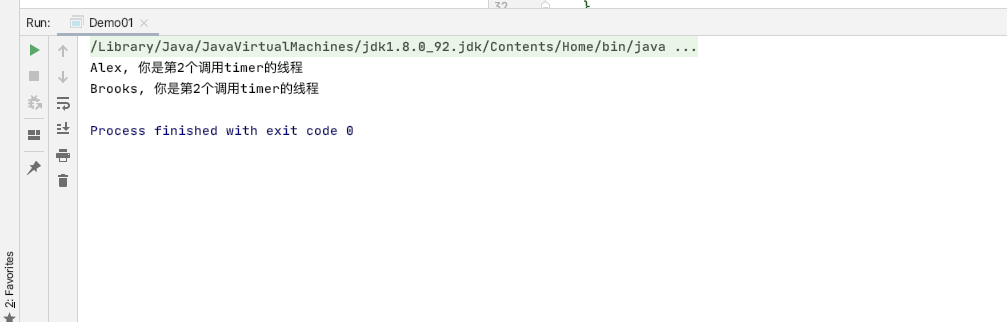
执行上述代码的现象:
分析: 上述代码的正常执行流程是: T1 执行完add()方法中的num++后sleep, 释放资源 , 给到T2执行; 同样T2 执行完add()方法中的num++后sleep, 释放资源. 所以当T1 重新获取到执行资格的时候, 此时num已经是2.
出现上述现象的原因就是在一个(T1)线程执行的过程中, 另一个线程(T2)也同样访问了该资源(num), 因为是同一个变量(内存中同一地址区域), 所以造成了混乱.
解决办法 直观的想法就是在一个线程访问执行某一资源的时候, 不能让其他线程使用或改变该资源. 这就引出了同步的概念
synchronized
1 2 3 4 5 6 7 8 9 10 11 12 13 14 15 16 17 18 19 20 21 22 23 24 25 26 27 28 29 30 31 32 33 34 35 package multiThreadDemos;public class Demo01 implements Runnable Timer timer=new Timer(); public static void main (String[] args) throws InterruptedException Demo01 demo= new Demo01(); Thread t1 = new Thread(demo); Thread t2 = new Thread(demo); t1.setName("Alex" ); t2.setName("Brooks" ); t1.start(); t2.start(); } @Override public void run () timer.add(Thread.currentThread().getName()); } static class Timer private static int num; public void add (String name) synchronized (this ){ num++; try { Thread.sleep(1 ); } catch (InterruptedException e) { e.printStackTrace(); } System.out.println(name+", 你是第" +num+"个调用timer的线程" ); } } } }
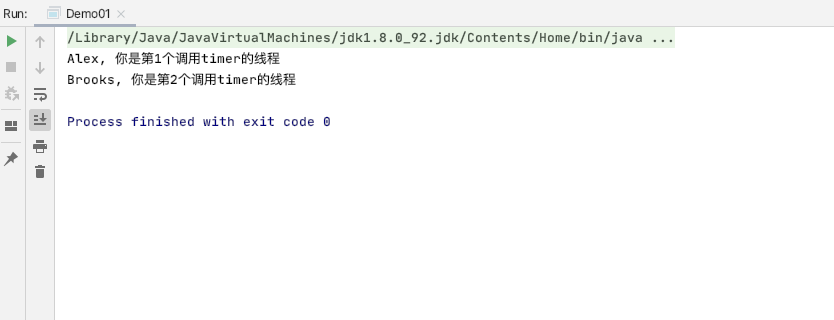
然后执行上述代码结果:
一种更简单的方法就是将synchronized关键字加在方法签名上
1 2 3 4 5 6 7 8 9 10 11 12 13 14 15 16 17 18 19 20 21 22 23 24 25 26 27 28 29 30 31 32 33 34 package multiThreadDemos;public class Demo01 implements Runnable Timer timer=new Timer(); public static void main (String[] args) throws InterruptedException Demo01 demo= new Demo01(); Thread t1 = new Thread(demo); Thread t2 = new Thread(demo); t1.setName("Alex" ); t2.setName("Brooks" ); t1.start(); t2.start(); } @Override public void run () timer.add(Thread.currentThread().getName()); } static class Timer private static int num; public synchronized void add (String name) num++; try { Thread.sleep(1 ); } catch (InterruptedException e) { e.printStackTrace(); } System.out.println(name+", 你是第" +num+"个调用timer的线程" ); } } }
死锁 产生原因: 同一个线程, 在执行run()里面的业务逻辑时, 对多个对象进行了’锁定’, 而这多个锁定的对象在多个线程值之间又有依赖关系, 此时就产生了死锁.
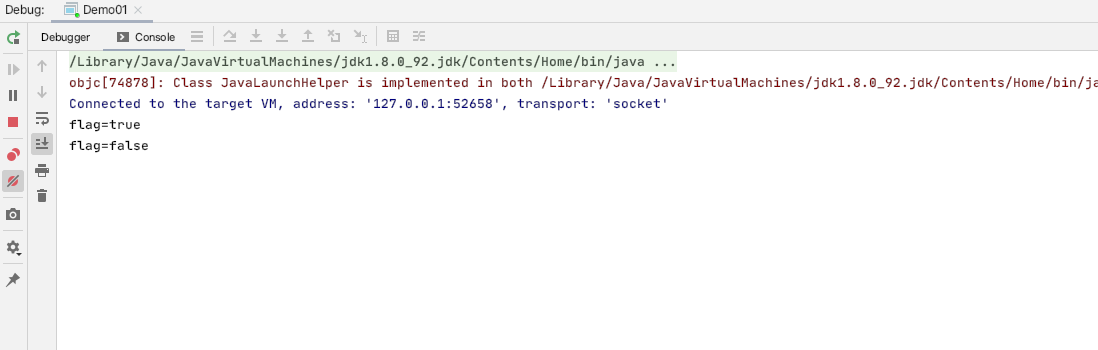
代码: 1 2 3 4 5 6 7 8 9 10 11 12 13 14 15 16 17 18 19 20 21 22 23 24 25 26 27 28 29 30 31 32 33 34 35 36 37 38 39 40 41 42 43 44 45 46 package multiThreadDemos;public class Demo01 implements Runnable public boolean flag=true ; static Object o1 = new Object(); static Object o2 = new Object(); public static void main (String[] args) throws InterruptedException Demo01 demo01 = new Demo01(); Demo01 demo02 = new Demo01(); demo01.flag=true ; demo02.flag=false ; Thread thread1 = new Thread(demo01); Thread thread2 = new Thread(demo02); thread1.setName("Alex" ); thread2.setName("Brooks" ); thread1.start(); thread2.start(); } @Override public void run () System.out.println("flag=" +flag); if (flag){ synchronized (o1){ try { Thread.sleep(1000 ); }catch (InterruptedException e){ e.printStackTrace(); } synchronized (o2){ System.out.println("1" ); } } } if (!flag){ synchronized (o2){ try { Thread.sleep(1000 ); }catch (InterruptedException e){ e.printStackTrace(); } synchronized (o1){ System.out.println("0" ); } } } } }
现象:
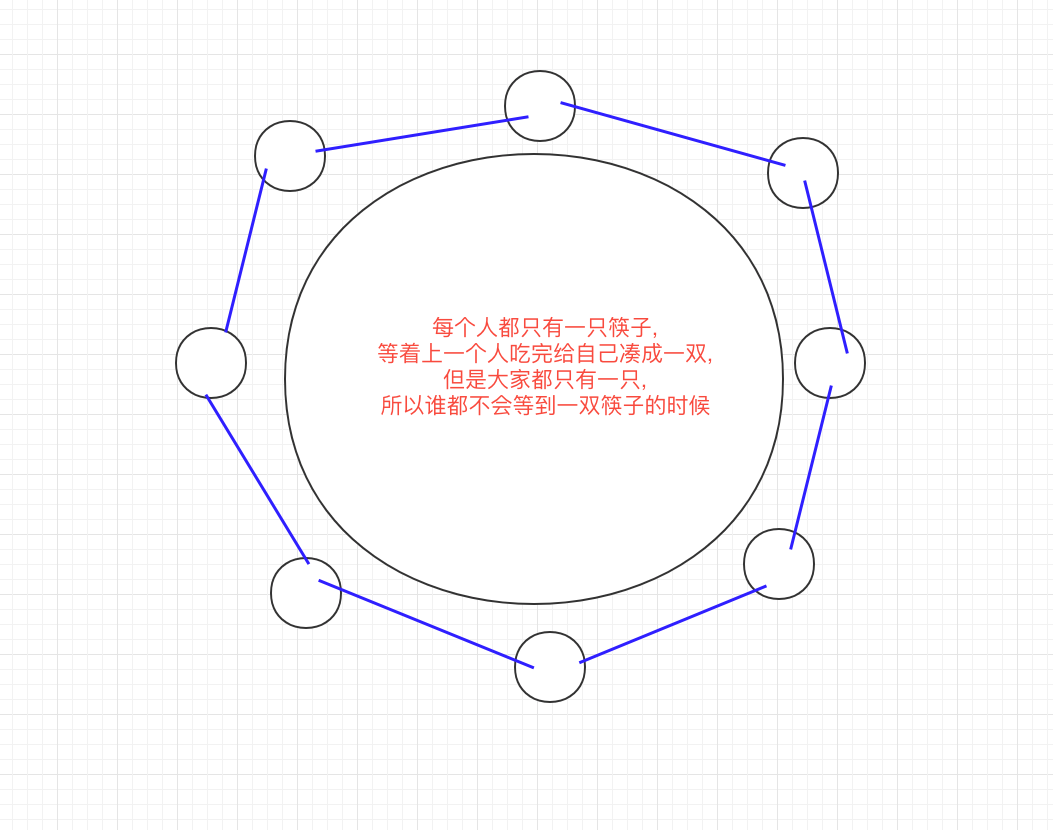
哲学家吃饭问题:
解决办法 将锁的粒度变为粗粒度.