多线程-Part05 | Eloise's Paradise
0%

多线程-Part05

本章节主要介绍多线程中park/unpark, 线程状态转换,线程并行度和锁粒度, 多把锁, 死锁/活锁/饥饿 等相关的知识点.

park-unpark初识

现象

首先通过一个小例子认识一下park/unpark能做什么.

1
2
3
4
5
6
7
8
9
10
11
12
13
14
15
16
17
18
19
20
21
22
23
24
25
26
27
28
29
package com.joshua.parkunpark5;

import com.joshua.util.Sleeper;
import lombok.extern.slf4j.Slf4j;

import java.util.concurrent.locks.LockSupport;

/**
* @author Joshua.H.Brooks
* @description
* @date 2022-05-10 09:49
*/
@Slf4j(topic = "parkUnpark")
public class TeskParkUnpark_1 {
public static void main(String[] args) {
Thread t1 = new Thread(() -> {
log.debug("start");
Sleeper.sleep(1_000); //
log.debug("park");
LockSupport.park();
log.debug("resume");
}, "t1");
t1.start();

Sleeper.sleep(2_000);//
log.debug("unpark");
LockSupport.unpark(t1);
}
}

运行上述代码查看结果:

park unpack初识

但是, 如果将main线程和t1线程里的睡眠时间做下互换,重新运行,会发现结果如下:

park-unpark倒序诡异现象

诡异的是,LockSupport.park()执行后, 继续几乎同时就执行了log.debug("resume");, 并没有因为park()方法的调用而使得程序停住。

结论

从上述现象可以看出:

⚠️unpark() 方法既可以在park() 方法之前调用, 也可以在park() 方法之后调用,而且不管之前之后, 再调对应线程的park方法时, 都不会停住程序。

与wait-notify对比

Park-Unpark Wait-Notify
不必 必须与Object Monitor配合使用
以线程为单位来阻塞和唤醒 notify随机唤醒, notifyAll唤醒所有, 相对不精确
Park-Unpark没有先后顺序 必须先wait再notify/notifyAll

原理

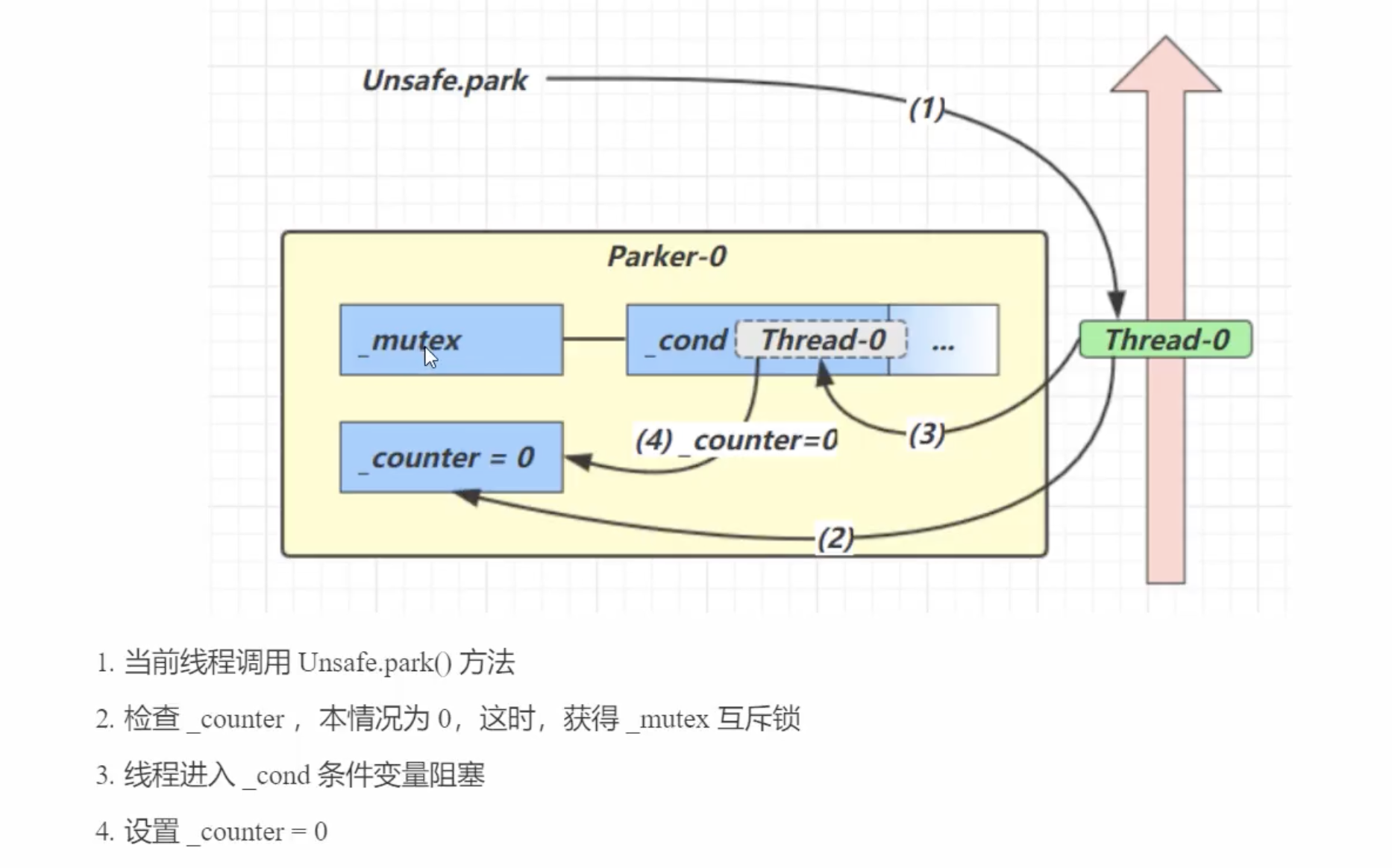
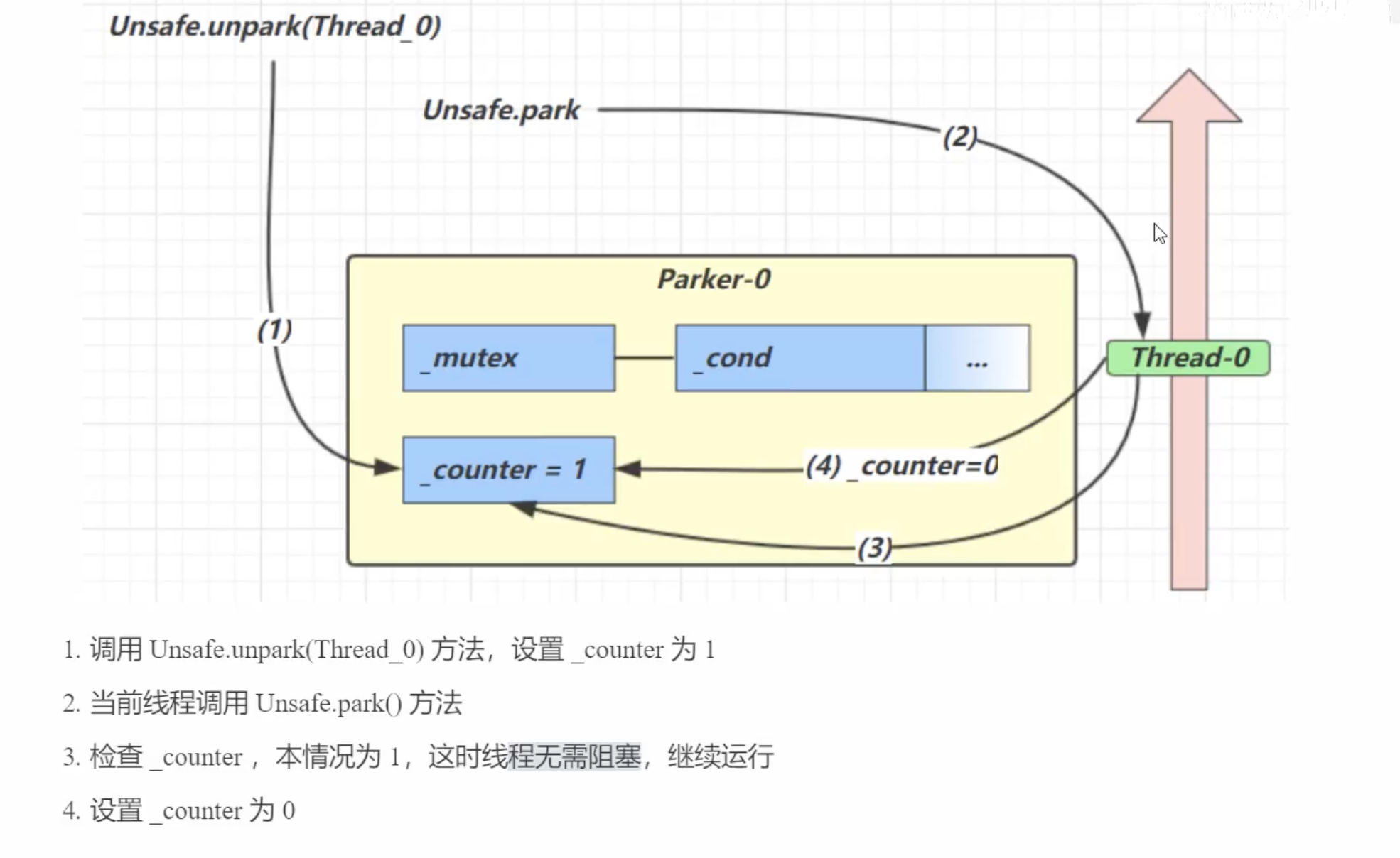
每个线程都维护一个线程独立的Parker对象, 其由三部分组成 _Counter, _cond, _mutex. 用下面的模型来描述就是:

  • 线程就像一个行军中的士兵, Parker就是他随身携带的背包。 _cond条件变量就好比背包中的帐篷。 _Counter就好比背包中的干粮(0为耗尽,1为充足)
  • 调用park就是看需不需要停下来休息。 取决于干粮状态, 耗尽就休息,否则继续前行。
  • 调用unpark就是补充干粮。 如果线程停住(耗尽干粮休息中), 那么unpark会为其补充干粮。 如果此时线程是前行状态(干粮充足),那么下次调用park时候, 仅仅是消耗掉备用干粮, 而不需停留。
  • 背包空间有限 , 多次调用unpark仅会补充一次干粮。

park底层原理流程

unpark底层原理流程

线程状态转换

回顾线程状态枚举类Thread.State

1
2
3
4
5
6
7
8
9
10
11
12
13
14
15
16
17
18
19
20
21
22
23
24
25
26
27
28
29
30
31
32
33
34
35
36
37
38
39
40
41
42
43
44
45
46
47
48
49
50
51
52
53
54
55
56
57
58
59
60
61
62
63
64
public enum State {
/**
* Thread state for a thread which has not yet started.
*/
NEW,

/**
* Thread state for a runnable thread. A thread in the runnable
* state is executing in the Java virtual machine but it may
* be waiting for other resources from the operating system
* such as processor.
*/
RUNNABLE,

/**
* Thread state for a thread blocked waiting for a monitor lock.
* A thread in the blocked state is waiting for a monitor lock
* to enter a synchronized block/method or
* reenter a synchronized block/method after calling
* {@link Object#wait() Object.wait}.
*/
BLOCKED,

/**
* Thread state for a waiting thread.
* A thread is in the waiting state due to calling one of the
* following methods:
* <ul>
* <li>{@link Object#wait() Object.wait} with no timeout</li>
* <li>{@link #join() Thread.join} with no timeout</li>
* <li>{@link LockSupport#park() LockSupport.park}</li>
* </ul>
*
* <p>A thread in the waiting state is waiting for another thread to
* perform a particular action.
*
* For example, a thread that has called <tt>Object.wait()</tt>
* on an object is waiting for another thread to call
* <tt>Object.notify()</tt> or <tt>Object.notifyAll()</tt> on
* that object. A thread that has called <tt>Thread.join()</tt>
* is waiting for a specified thread to terminate.
*/
WAITING,

/**
* Thread state for a waiting thread with a specified waiting time.
* A thread is in the timed waiting state due to calling one of
* the following methods with a specified positive waiting time:
* <ul>
* <li>{@link #sleep Thread.sleep}</li>
* <li>{@link Object#wait(long) Object.wait} with timeout</li>
* <li>{@link #join(long) Thread.join} with timeout</li>
* <li>{@link LockSupport#parkNanos LockSupport.parkNanos}</li>
* <li>{@link LockSupport#parkUntil LockSupport.parkUntil}</li>
* </ul>
*/
TIMED_WAITING,

/**
* Thread state for a terminated thread.
* The thread has completed execution.
*/
TERMINATED;
}

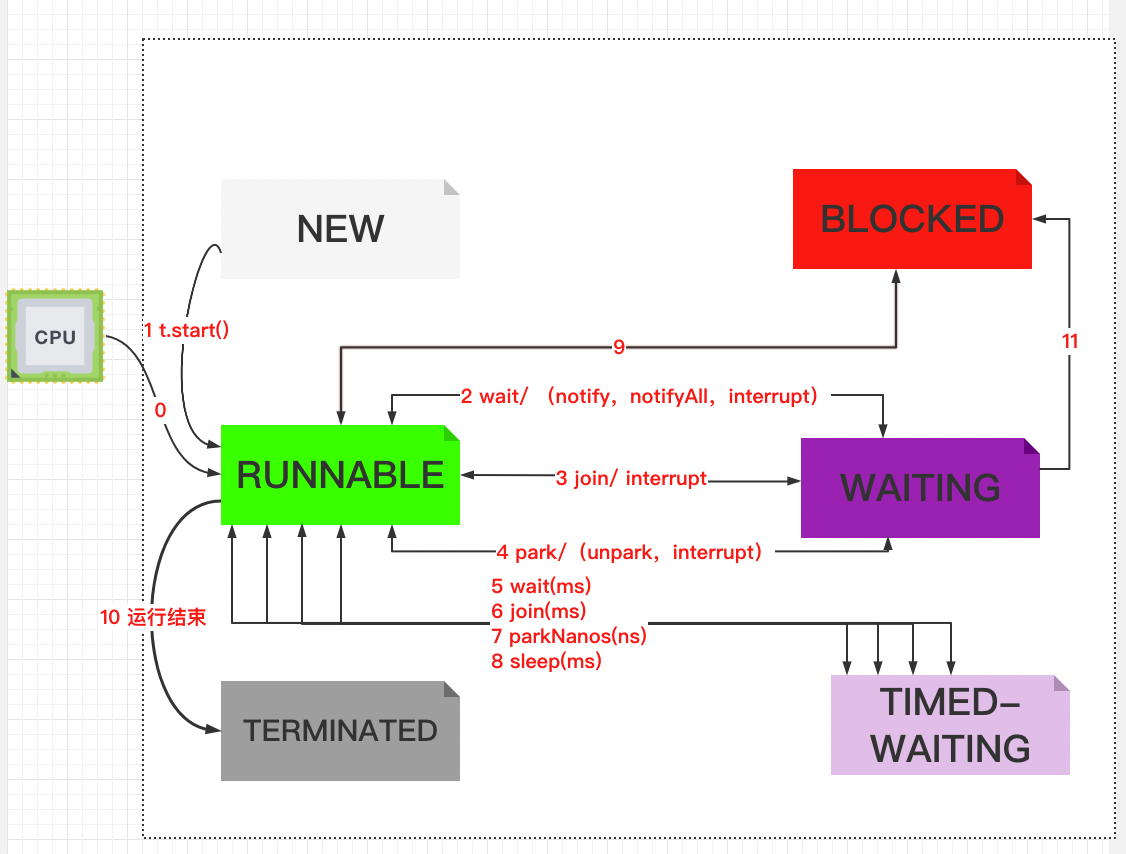
注意⚠️: 直线是双向箭头, 曲线为单向箭头。

状态转换解释

图解线程状态转换

首先, 只要线程一创建就处于NEW状态了, 上图中有向箭头描述的底层调用描述如下:

  1. t.start()调用会让线程从NEW转为RUNNABLE

  2. t在使用synchronized(obj) 获取锁对象之后, 调用obj.wait()会使RUNNABLE –> WAITING (上图2)

  3. 当调用obj.notify(),obj.notifyAll()或者t.interrupt()方法后

    如果竞争锁成功, 则 WAITING –> RUNNABLE (上图中2)

    如果竞争锁失败, 则 WAITING –> BLOCKED (上图中11)

  4. t.join() 方法调用时会: RUNNABLE –> WAITING (上图3), 注意当前线程是在t线程对象的监视器monitor上等待

  5. t线程运行结束或者调用了当前线程的interrupt()方法则: WAITING –> RUNNABLE (上图3)

  6. 当前线程调用LockSupport.park() 会 RUNNABLE –> WAITING, LockSupport.unpark()或者interrupt()则: WAITING –> RUNNABLE (上图4)

  7. t在使用synchronized(obj) 获取锁对象之后, 调用obj.wait(long ms)会使RUNNABLE –> TIMED-WAITING (上图5), 当调用obj.notify(),obj.notifyAll()或者t.interrupt()方法后

    如果竞争锁成功, 则 TIMED-WAITING –> RUNNABLE (上图中5)

    如果竞争锁失败, 则 TIMED-WAITING –> BLOCKED (上图中11)

  8. t.join(long ms) 方法调用时会: RUNNABLE –> TIMED-WAITING , 注意当前线程是在t线程对象的监视器monitor上等待. 同样跳用interrupt()方法则: TIMED-WAITING –> RUNNABLE (上图6)

  9. 当前线程调用LockSupport.parkNanos(ns)或者parkUntil(long millis)时 会 RUNNABLE –> WAITING, LockSupport.unpark(目标线程)或者interrupt()则: WAITING –> RUNNABLE (上图7)

  10. Thread.sleep(long ms) 当前线程则: RUNNABLE –> TIMED-WAITING , 当sleep时间超过时则自动从TIMED-WAITING –> RUNNABLE.(上图8)

  11. t线程用synchronized(obj)获取了对象锁时如果竞争失败, 则 RUNNABLE –> BLOCKED. 持有obj锁线程的同步代码块执行完毕,会唤醒该对象上所有BLOCKED线程,重新竞争。如果其中t线程竞争成功,则 BLOCKED –> RUNNABLE (上图9)

  12. 所有线程代码执行完毕 RUNNABLE –> TERMINATED (上图10).

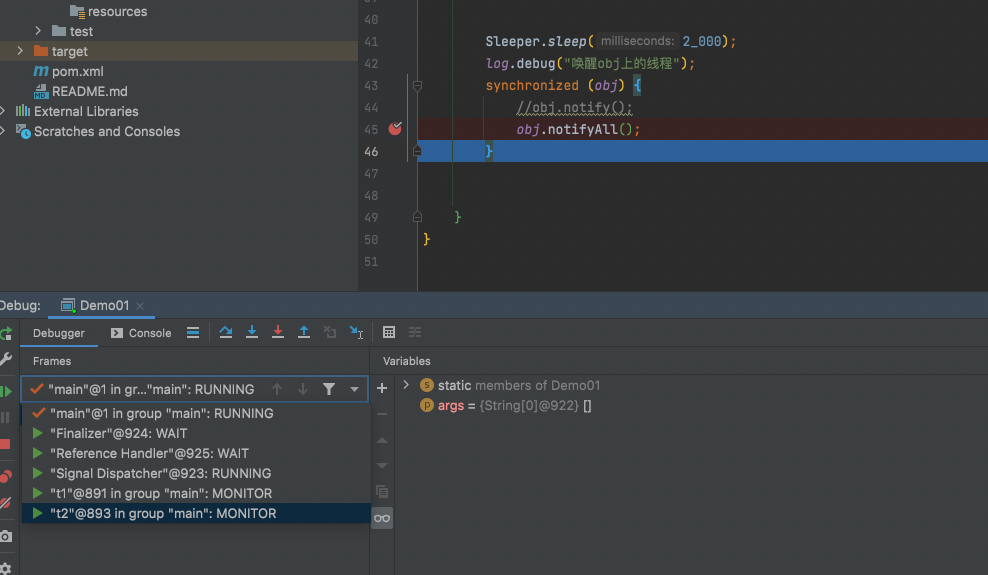
对状态转换解释中1-3的测试代码如下, 打三个断点(都是<span style="color:red">**Thread级别** </span>, 而非All级别的断点), debug模式启动:

1
2
3
4
5
6
7
8
9
10
11
12
13
14
15
16
17
18
19
20
21
22
23
24
25
26
27
28
29
30
31
32
33
34
35
36
37
38
39
40
41
42
43
44
45
46
47
48
49
50
package com.joshua.StateTransTest6;

import com.joshua.util.Sleeper;
import lombok.extern.slf4j.Slf4j;

/**
* @author Joshua.H.Brooks
* @description 用来测试线程状态转换
* @date 2022-05-10 13:16
*/
@Slf4j(topic = "c.StateTransTest")
public class Demo01 {
final static Object obj = new Object();

public static void main(String[] args) {
new Thread(() -> {
synchronized (obj) {
log.debug(Thread.currentThread().getName() + "执行。。");
try {
obj.wait();
} catch (InterruptedException e) {
e.printStackTrace();
}
log.debug(Thread.currentThread().getName() + "其他代码。。。。。。"); //断点
}
}, "t1").start();

new Thread(() -> {
synchronized (obj) {
log.debug(Thread.currentThread().getName() + "执行。。");
try {
obj.wait();
} catch (InterruptedException e) {
e.printStackTrace();
}
log.debug(Thread.currentThread().getName() + "其他代码。。。。。。"); //断点
}
}, "t2").start();


Sleeper.sleep(2_000);
log.debug("唤醒obj上的线程");
synchronized (obj) {
//obj.notify();
obj.notifyAll(); //断点
}


}
}
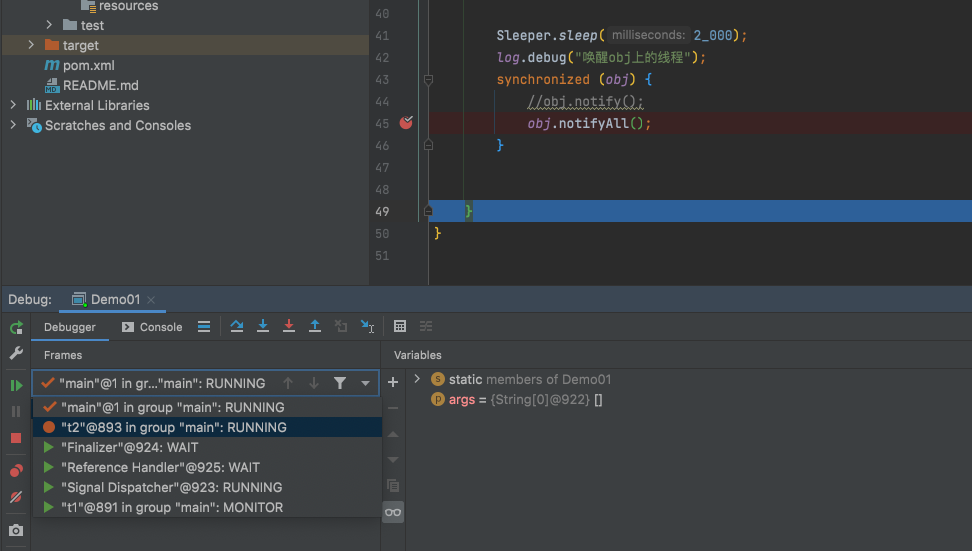
<span style="color:red">**注意⚠️由于IDEA内部的定义问题, 显示有所不同。 但是对应关系为:<br/> RUNNING<-->RUNNABLE<br/> MONITOR <--> BLOCKED<br/>ZOMBIED<--> TERMINATED**</span> 首先进入第三个断点, 此时查看线程状态 发现主线成为RUNNABLE, 而t1和t2为WAITING 状态。 ![Screenshot 2022-05-10 at 13.33.14](多线程-Part05/Screenshot2022-05-10at13.33.14.png) 断点(Mac: fn+F8) step over到下一行,此时再查看发现t1和t2变为Monitor 也就是BLOCKED状态。<span style="color:red">**注意⚠️执行到这里主线程还没有释放掉锁。**</span>

再 step over到下一行, 查看线程状态:到这里主线程释放掉锁,并且被t2线程竞争到, 所以 t2变成了RUNNABLE,而t1还是BLOCKED。

Screenshot 2022-05-10 at 13.45.20

多把锁

互不相干的锁

1
2
3
4
5
6
7
8
9
10
11
12
13
14
15
16
17
18
19
20
21
22
23
24
25
26
27
28
29
30
31
32
33
34
35
36
37
38
package com.joshua.Multilock;

import com.joshua.util.Sleeper;
import lombok.extern.slf4j.Slf4j;

/**
* @author Joshua.H.Brooks
* @description 多把锁测试
* @date 2022-05-10 17:27
*/
@Slf4j(topic = "c.multilock")
public class Demo01 {
public static void main(String[] args) {
BigRoom bigRoom = new BigRoom();
new Thread(() -> {
bigRoom.study();
}, "study").start();

new Thread(() -> {
bigRoom.rest();
}, "rest").start();
}
}
@Slf4j(topic = "c.BigRoom")
class BigRoom{
public void study(){
synchronized (this){
log.debug("学习一小时");
Sleeper.sleep(2_000);
}
}
public void rest(){
synchronized (this){
log.debug("休息一小时");
Sleeper.sleep(1_000);
}
}
}

运行结果:

同一把锁的情况

发现几乎是串行的。 因为上述两个线程用的是同一把锁。但是因为本身两个方法是独立的互不依赖的, 所以寻求更加高效并行的方式。所以将锁换成了:

1
2
3
4
5
6
7
8
9
10
11
12
13
14
15
16
17
18
19
20
21
22
23
24
25
26
27
28
29
30
31
32
33
34
35
36
37
38
39
40
41
42
43
package com.joshua.Multilock;

import com.joshua.util.Sleeper;
import lombok.extern.slf4j.Slf4j;

/**
* @author Joshua.H.Brooks
* @description 多把锁测试
* @date 2022-05-10 17:27
*/
@Slf4j(topic = "c.multilock")
public class Demo01 {
public static void main(String[] args) {
BigRoom bigRoom = new BigRoom();
new Thread(() -> {
bigRoom.study();
}, "study").start();

new Thread(() -> {
bigRoom.rest();
}, "rest").start();
}
}

@Slf4j(topic = "c.BigRoom")
class BigRoom {
Object studyRoom = new Object();
Object restRoom = new Object();

public void study() {
synchronized (studyRoom) {
log.debug("学习一小时");
Sleeper.sleep(2_000);
}
}

public void rest() {
synchronized (restRoom) {
log.debug("休息一小时");
Sleeper.sleep(1_000);
}
}
}

再次运行, 发现几乎同时执行两个线程:

不同锁的情况

将锁的粒度细分可以增强并发度。但是如果一个线程需要同时获得多把锁, 就容易产生死锁。

活跃性 (死锁,活锁,饥饿)

死锁

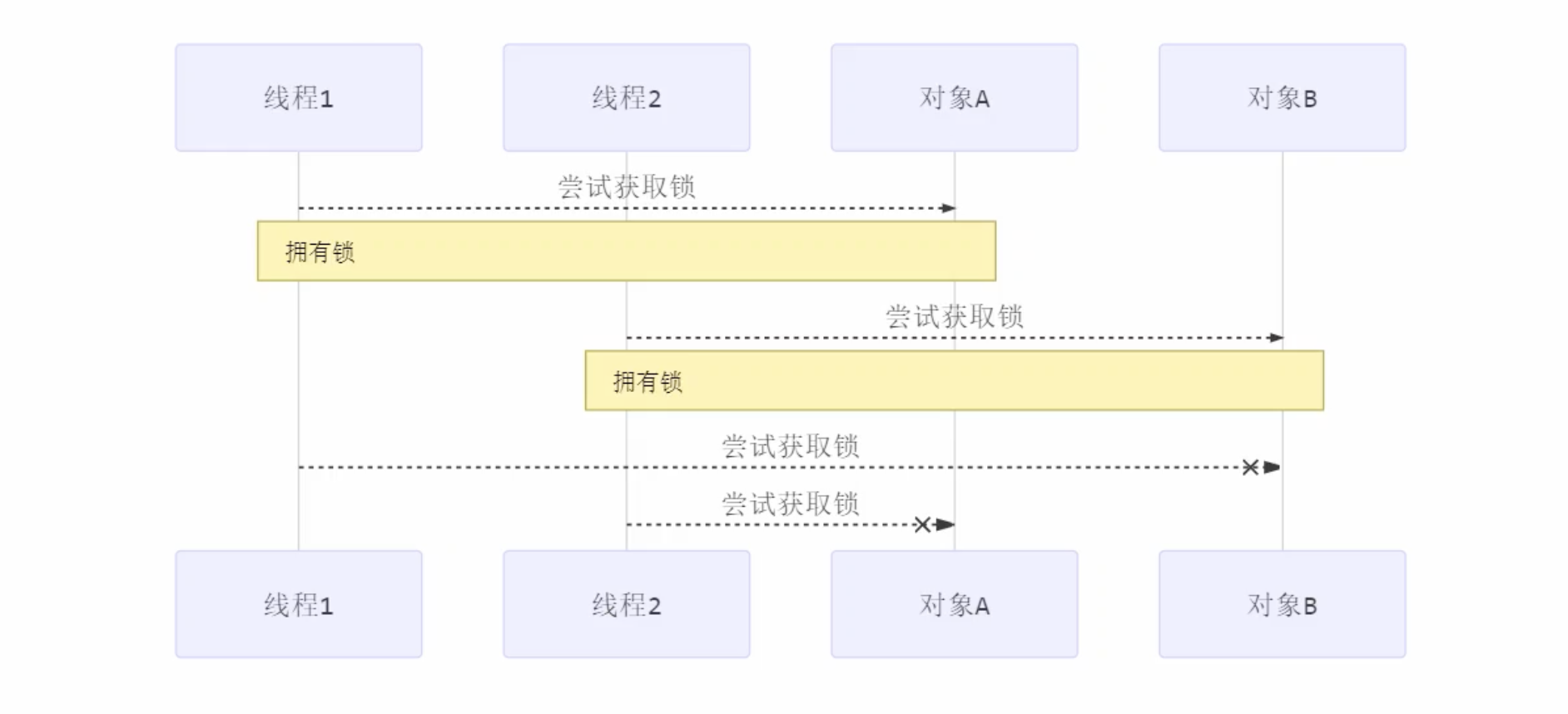
有这样一种情况, 一个线程需要同时获取多把锁,这时就容易发生死锁。

t1线程获得A对象锁, 接下来想获取B对象锁。

t2线程获得B对象锁, 接下来想获取A对象锁。

例如:

1
2
3
4
5
6
7
8
9
10
11
12
13
14
15
16
17
18
19
20
21
22
23
24
25
26
27
28
29
30
31
32
33
34
35
36
37
38
39
40
41
42
43
44
package com.joshua.Multilock_7;

import com.joshua.util.Sleeper;
import lombok.extern.slf4j.Slf4j;

/**
* @author Joshua.H.Brooks
* @description
* @date 2022-05-10 18:19
*/
@Slf4j(topic = "c.DeadLock")
public class DeadLock {
public static void main(String[] args) {
test();
}

private static void test() {
Object A = new Object();
Object B = new Object();
Thread t1 = new Thread(() -> {
synchronized (A) {
log.debug(Sleeper.getThreadName() + "获得了A锁,接下来想获取B锁");
Sleeper.sleep(1_000);
synchronized (B) {
log.debug(Sleeper.getThreadName() + "获得B锁也成功");
log.debug("继续前进吧。。。");
}
}
}, "t1");

Thread t2 = new Thread(() -> {
synchronized (B) {
log.debug(Sleeper.getThreadName() + "获得了B锁,接下来想获取A锁");
Sleeper.sleep(1_000);
synchronized (A) {
log.debug(Sleeper.getThreadName() + "获得A锁也成功");
log.debug("继续前进吧。。。");
}
}
}, "t2");
t1.start();
t2.start();
}
}

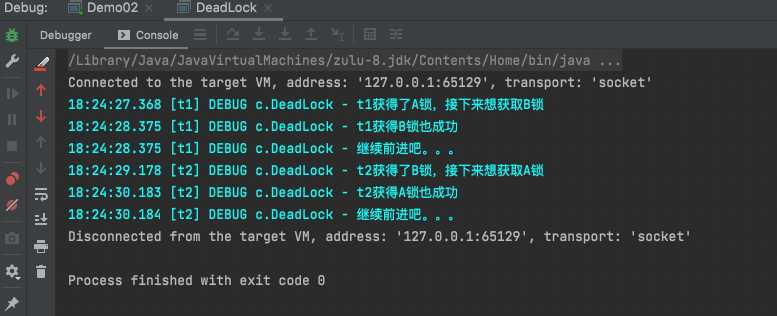
上面代码可能会正常运行完毕结果如下:

正常运行完毕

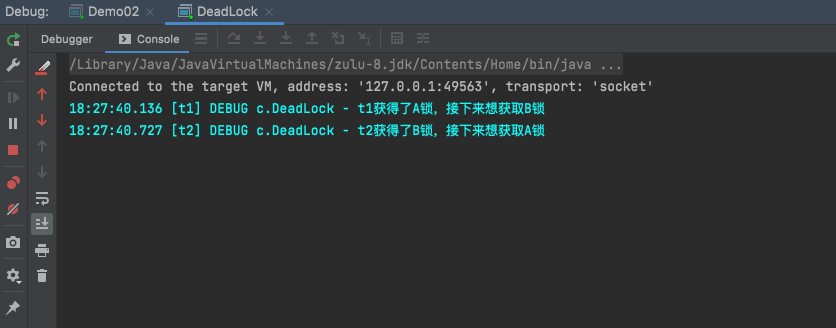
但也有可能会造成死锁现象卡死:

Screenshot 2022-05-10 at 18.27.51

定位死锁

检测定位死锁可以用两种方法:

方法一:jps+jstack

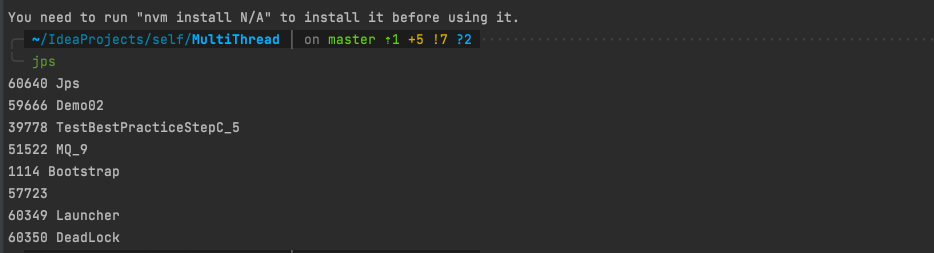
先执行jps找到进程

Screenshot 2022-05-10 at 18.32.52

然后执行jstack pid (这里pid是60350)得到:

1
2
3
4
5
6
7
8
9
10
11
12
13
14
15
16
17
18
19
20
21
22
23
24
25
26
27
28
29
30
31
32
33
34
35
36
37
38
39
40
41
42
43
44
45
46
47
48
49
50
51
52
53
54
55
56
57
58
59
60
61
62
63
64
65
66
67
68
69
70
71
72
73
74
75
76
77
78
79
80
81
82
83
84
85
86
87
88
89
90
91
92
93
94
95
96
97
98
99
100
101
102
103
104
105
106
107
108
109
110
111
112
113
114
115
116
117
118
119
120
2022-05-10 18:32:25
Full thread dump OpenJDK 64-Bit Server VM (25.282-b08 mixed mode):

"Attach Listener" #16 daemon prio=9 os_prio=31 tid=0x0000000121071000 nid=0x3307 waiting on condition [0x0000000000000000]
java.lang.Thread.State: RUNNABLE

"DestroyJavaVM" #15 prio=5 os_prio=31 tid=0x000000012706e800 nid=0x2903 waiting on condition [0x0000000000000000]
java.lang.Thread.State: RUNNABLE

"t2" #14 prio=5 os_prio=31 tid=0x0000000130090800 nid=0xa303 waiting for monitor entry [0x0000000172a82000]
java.lang.Thread.State: BLOCKED (on object monitor)
at com.joshua.Multilock_7.DeadLock.lambda$test$1(DeadLock.java:36)
- waiting to lock <0x0000000716138e48> (a java.lang.Object)
- locked <0x0000000716138e58> (a java.lang.Object)
at com.joshua.Multilock_7.DeadLock$$Lambda$2/1567581361.run(Unknown Source)
at java.lang.Thread.run(Thread.java:748)

"t1" #13 prio=5 os_prio=31 tid=0x00000001278d1800 nid=0xa403 waiting for monitor entry [0x0000000172876000]
java.lang.Thread.State: BLOCKED (on object monitor)
at com.joshua.Multilock_7.DeadLock.lambda$test$0(DeadLock.java:25)
- waiting to lock <0x0000000716138e58> (a java.lang.Object)
- locked <0x0000000716138e48> (a java.lang.Object)
at com.joshua.Multilock_7.DeadLock$$Lambda$1/1915503092.run(Unknown Source)
at java.lang.Thread.run(Thread.java:748)

"Service Thread" #12 daemon prio=9 os_prio=31 tid=0x000000011d03c800 nid=0x5803 runnable [0x0000000000000000]
java.lang.Thread.State: RUNNABLE

"C1 CompilerThread3" #11 daemon prio=9 os_prio=31 tid=0x0000000127838000 nid=0x5703 waiting on condition [0x0000000000000000]
java.lang.Thread.State: RUNNABLE

"C2 CompilerThread2" #10 daemon prio=9 os_prio=31 tid=0x0000000127837000 nid=0x5603 waiting on condition [0x0000000000000000]
java.lang.Thread.State: RUNNABLE

"C2 CompilerThread1" #9 daemon prio=9 os_prio=31 tid=0x000000012601e000 nid=0x3703 waiting on condition [0x0000000000000000]
java.lang.Thread.State: RUNNABLE

"C2 CompilerThread0" #8 daemon prio=9 os_prio=31 tid=0x000000012601b000 nid=0x3903 waiting on condition [0x0000000000000000]
java.lang.Thread.State: RUNNABLE

"JDWP Command Reader" #7 daemon prio=10 os_prio=31 tid=0x000000012781d800 nid=0x3603 runnable [0x0000000000000000]
java.lang.Thread.State: RUNNABLE

"JDWP Event Helper Thread" #6 daemon prio=10 os_prio=31 tid=0x000000011e01a800 nid=0x3c03 runnable [0x0000000000000000]
java.lang.Thread.State: RUNNABLE

"JDWP Transport Listener: dt_socket" #5 daemon prio=10 os_prio=31 tid=0x000000011e019800 nid=0x3d07 runnable [0x0000000000000000]
java.lang.Thread.State: RUNNABLE

"Signal Dispatcher" #4 daemon prio=9 os_prio=31 tid=0x000000012701d800 nid=0x3f03 runnable [0x0000000000000000]
java.lang.Thread.State: RUNNABLE

"Finalizer" #3 daemon prio=8 os_prio=31 tid=0x0000000126019000 nid=0x2f03 in Object.wait() [0x00000001710da000]
java.lang.Thread.State: WAITING (on object monitor)
at java.lang.Object.wait(Native Method)
- waiting on <0x0000000715588ef0> (a java.lang.ref.ReferenceQueue$Lock)
at java.lang.ref.ReferenceQueue.remove(ReferenceQueue.java:144)
- locked <0x0000000715588ef0> (a java.lang.ref.ReferenceQueue$Lock)
at java.lang.ref.ReferenceQueue.remove(ReferenceQueue.java:165)
at java.lang.ref.Finalizer$FinalizerThread.run(Finalizer.java:216)

"Reference Handler" #2 daemon prio=10 os_prio=31 tid=0x000000011e017800 nid=0x4803 in Object.wait() [0x0000000170ece000]
java.lang.Thread.State: WAITING (on object monitor)
at java.lang.Object.wait(Native Method)
- waiting on <0x0000000715586c08> (a java.lang.ref.Reference$Lock)
at java.lang.Object.wait(Object.java:502)
at java.lang.ref.Reference.tryHandlePending(Reference.java:191)
- locked <0x0000000715586c08> (a java.lang.ref.Reference$Lock)
at java.lang.ref.Reference$ReferenceHandler.run(Reference.java:153)

"VM Thread" os_prio=31 tid=0x000000011e011000 nid=0x2e03 runnable

"ParGC Thread#0" os_prio=31 tid=0x0000000127815800 nid=0x1f07 runnable

"ParGC Thread#1" os_prio=31 tid=0x0000000127816000 nid=0x2003 runnable

"ParGC Thread#2" os_prio=31 tid=0x0000000127817000 nid=0x5403 runnable

"ParGC Thread#3" os_prio=31 tid=0x0000000127817800 nid=0x5203 runnable

"ParGC Thread#4" os_prio=31 tid=0x0000000127818800 nid=0x5003 runnable

"ParGC Thread#5" os_prio=31 tid=0x0000000130008800 nid=0x2b03 runnable

"ParGC Thread#6" os_prio=31 tid=0x0000000127819000 nid=0x4e03 runnable

"ParGC Thread#7" os_prio=31 tid=0x000000012781a000 nid=0x2d03 runnable

"ParGC Thread#8" os_prio=31 tid=0x000000012781a800 nid=0x4b03 runnable

"VM Periodic Task Thread" os_prio=31 tid=0x0000000127020800 nid=0xa603 waiting on condition

JNI global references: 3089


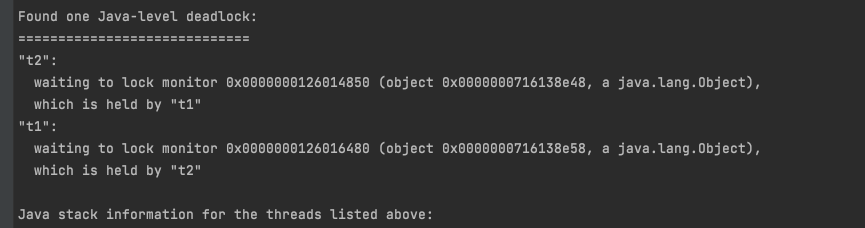
Found one Java-level deadlock:
=============================
"t2":
waiting to lock monitor 0x0000000126014850 (object 0x0000000716138e48, a java.lang.Object),
which is held by "t1"
"t1":
waiting to lock monitor 0x0000000126016480 (object 0x0000000716138e58, a java.lang.Object),
which is held by "t2"

Java stack information for the threads listed above:
===================================================
"t2":
at com.joshua.Multilock_7.DeadLock.lambda$test$1(DeadLock.java:36)
- waiting to lock <0x0000000716138e48> (a java.lang.Object)
- locked <0x0000000716138e58> (a java.lang.Object)
at com.joshua.Multilock_7.DeadLock$$Lambda$2/1567581361.run(Unknown Source)
at java.lang.Thread.run(Thread.java:748)
"t1":
at com.joshua.Multilock_7.DeadLock.lambda$test$0(DeadLock.java:25)
- waiting to lock <0x0000000716138e58> (a java.lang.Object)
- locked <0x0000000716138e48> (a java.lang.Object)
at com.joshua.Multilock_7.DeadLock$$Lambda$1/1915503092.run(Unknown Source)
at java.lang.Thread.run(Thread.java:748)

Found 1 deadlock.

jstack pid 结果

从输出结果可以看出确实产生了死锁。

方法二: JConsole

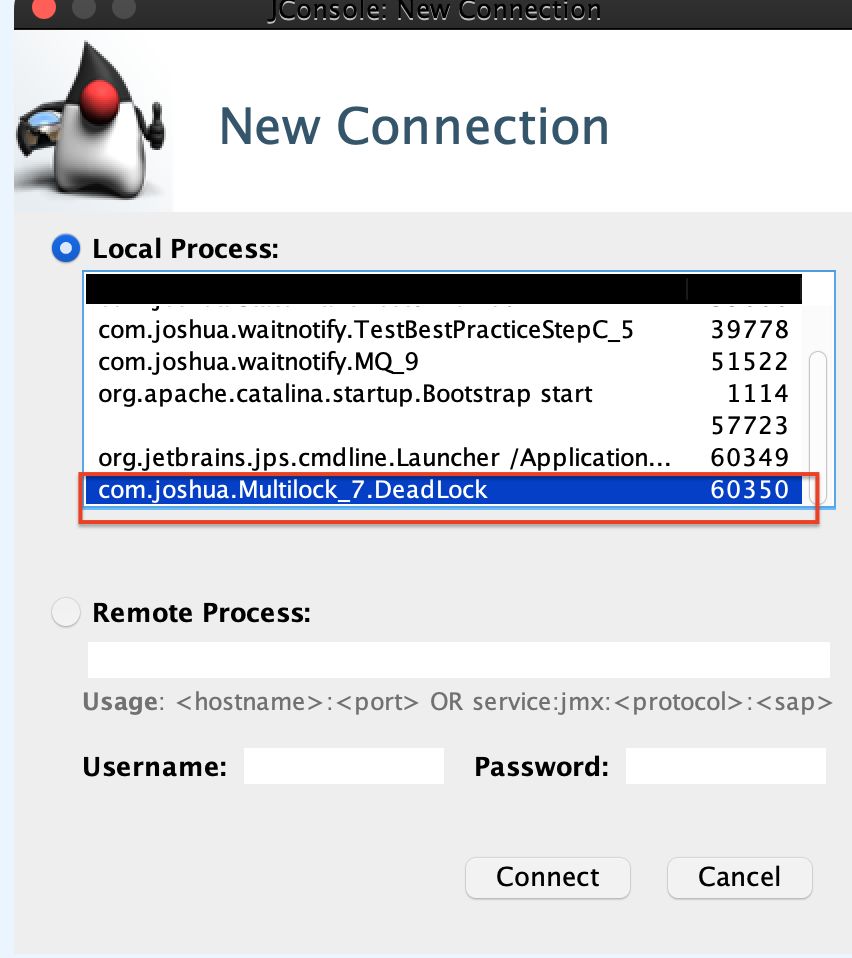
启动jconsole连接到DeadLock进程

jconsole启动连接对应进程

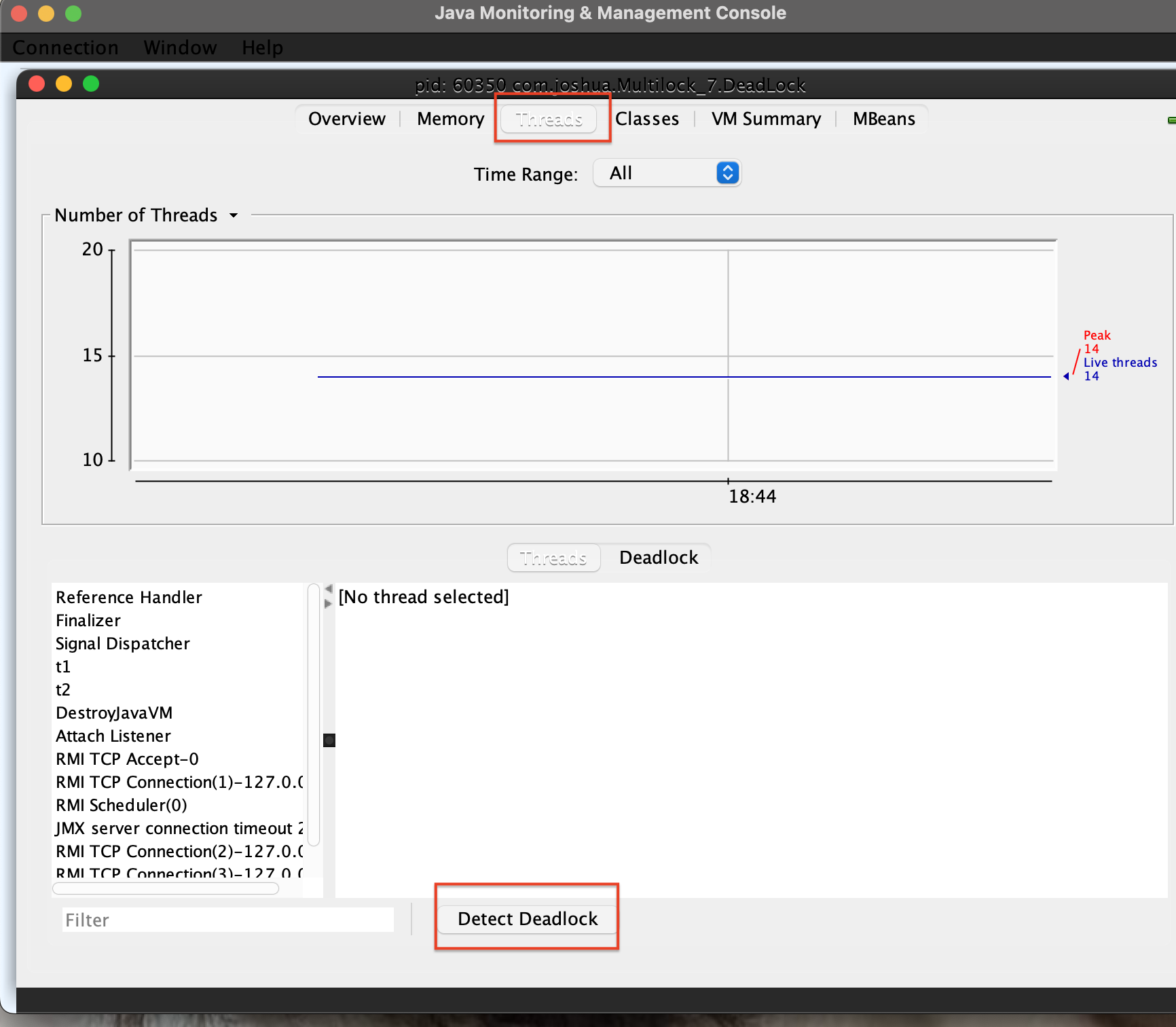
然后选择Threads标签页 并点击 Detect Deadlock 按钮

Screenshot 2022-05-10 at 18.44.25

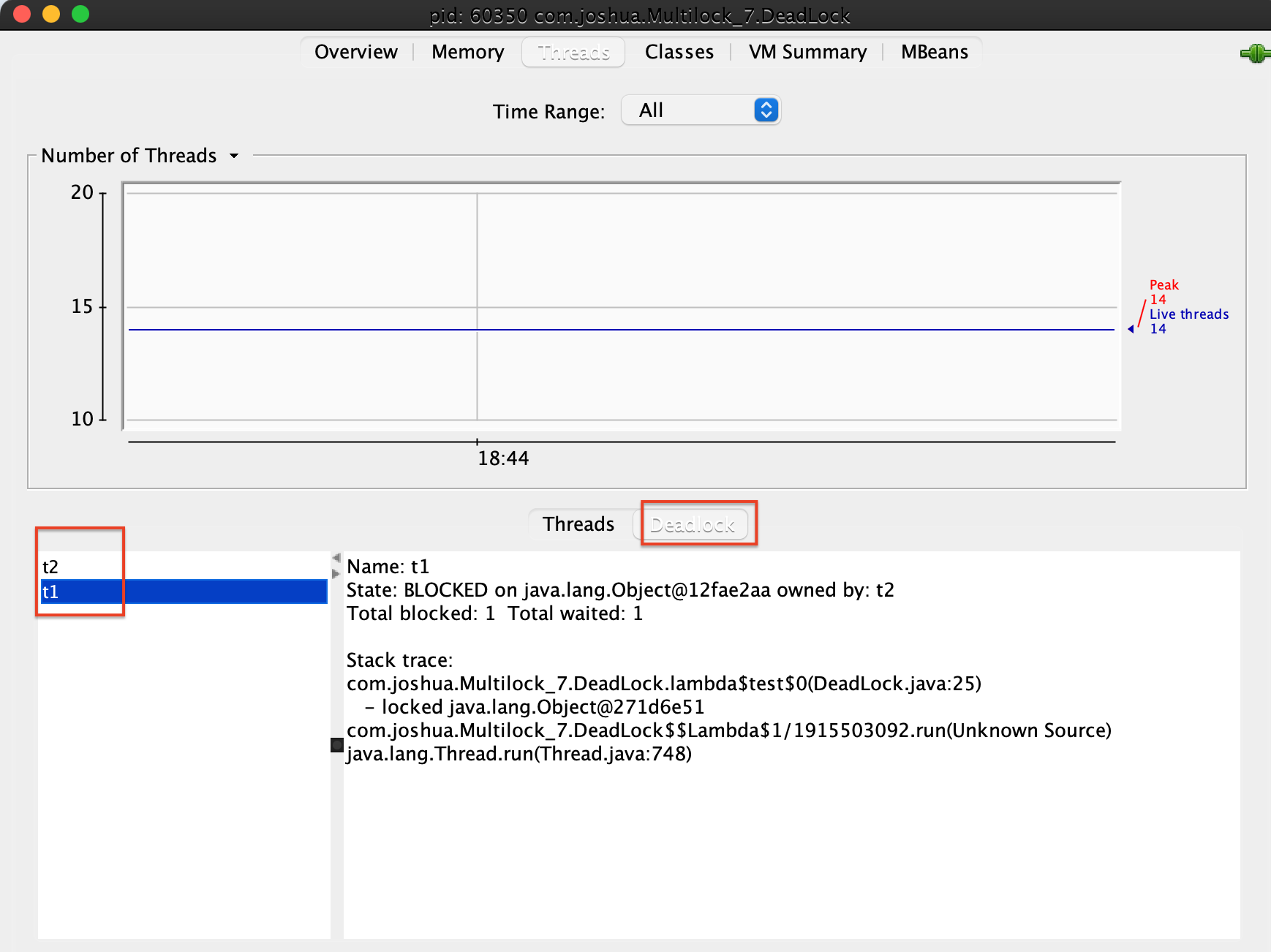
最后在deadlock标签页发现有 t1&t2两个线程。

找到死锁线程

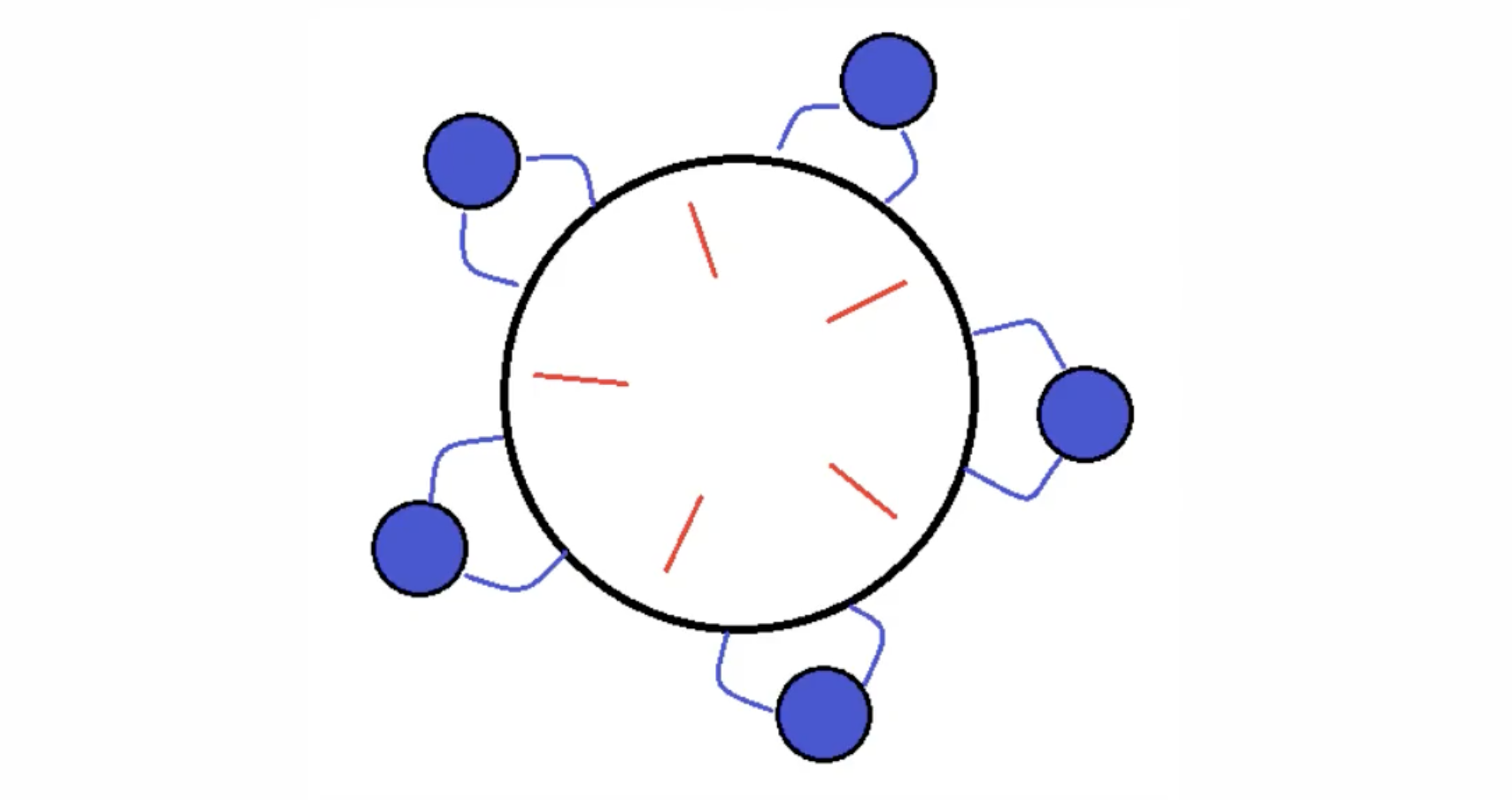
哲学家就餐问题

scenario:

有五位哲学家围坐圆桌旁。

他们只做两件事, 吃饭和思考。交替进行。

吃饭时要用两根筷子, 桌上共有5根筷子,如下图摆放。

如果筷子被身边的人拿了, 那自己就得等着。

Screenshot 2022-05-10 at 18.54.40

对于上述场景, 如果五根筷子被5个哲学家分别各持一根, 那么就产生死锁了。因为所有人都在等待邻座吃完将筷子传递过来。

代码:

1
2
3
4
5
6
7
8
9
10
11
12
13
14
15
16
17
18
19
20
21
22
23
24
25
26
27
28
29
30
31
32
33
34
35
36
37
38
39
40
41
42
43
44
45
46
47
48
49
50
51
52
53
54
55
56
57
58
59
60
61
62
63
64
65
66
67
68
69
70
71
72
package com.joshua.Multilock_7;

import com.joshua.util.Sleeper;
import lombok.extern.slf4j.Slf4j;

/**
* @author Joshua.H.Brooks
* @description 哲学家就餐问题的代码演示
* @date 2022-05-10 18:59
*/
@Slf4j(topic = "c.PhilosopherEating")
public class PhilosopherEating {
public static void main(String[] args) {
Chopstick c1 = new Chopstick("1");
Chopstick c2 = new Chopstick("2");
Chopstick c3 = new Chopstick("3");
Chopstick c4 = new Chopstick("4");
Chopstick c5 = new Chopstick("5");
new Philosopher("苏格拉底", c1, c2).start();
new Philosopher("柏拉图", c2, c3).start();
new Philosopher("亚里士多德", c3, c4).start();
new Philosopher("赫拉克利特", c4, c5).start();
new Philosopher("阿基米德", c5, c1).start();

}
}

@Slf4j(topic = "c.Philosopher")
class Philosopher extends Thread {
Chopstick left;
Chopstick right;

public Philosopher(String name, Chopstick left, Chopstick right) {
super(name);
this.left = left;
this.right = right;
}

@Override
public void run() {
while (true) {
synchronized (left) {
log.debug("获得了左手筷子");
synchronized (right) {
log.debug("又获得了右手筷子");
eat();
}
}
}
}

private void eat() {
log.debug("双筷在手,开始干饭");
Sleeper.sleep(1_000);
}
}

@Slf4j(topic = "c.Chopstick")
class Chopstick {
private String name;

public Chopstick(String name) {
this.name = name;
}

@Override
public String toString() {
return "Chopstick{" +
"name='" + name + '\'' +
'}';
}
}

运行代码:

哲学家就餐代码结果

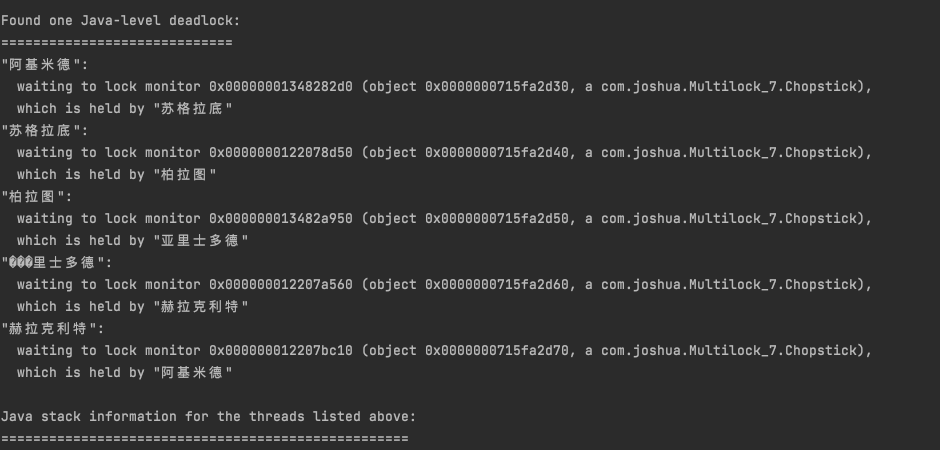
所有哲学家都获得了左手边的筷子, 很显然又产生了死锁。 用死锁定位中的方法一进行定位验证自己的猜想发现确实死锁了:

哲学家就餐死锁验证

产生原因总结

(1)互斥条件:⼀个资源只能被⼀个线程占有,当这个资源被占⽤之后其他线程就只能等待。
(2)不可剥夺条件:当⼀个线程不主动释放资源时,此资源⼀直被拥有线程占有。
(3)请求并持有条件:线程已经拥有了⼀个资源之后,有尝试请求新的资源。
(4)环路等待条件:产⽣死锁⼀定是发⽣了线程资源环形链。
注意⚠️: 以上四个条件是产生死锁的必要条件,若要产生死锁,以上四个条件缺一不可。也就是说死锁的产生不是由于上述四个条件当中的某一个因素所导致的,而是四个因素共同作用所导致的。

活锁

活锁出现在两个线程互相改变对方的结束条件, 最后谁也无法结束 例如:

1
2
3
4
5
6
7
8
9
10
11
12
13
14
15
16
17
18
19
20
21
22
23
24
25
26
27
28
29
30
31
32
33
34
package com.joshua.Multilock_7;

import com.joshua.util.Sleeper;
import lombok.extern.slf4j.Slf4j;

/**
* @author Joshua.H.Brooks
* @description
* @date 2022-05-10 19:32
*/
@Slf4j(topic = "c.TestLiveLock_4")
public class TestLiveLock_4 {
static volatile int count = 10;
static final Object lock = new Object();

public static void main(String[] args) {
new Thread(() -> {
while (count > 0) {
Sleeper.sleep(100);
count--;
log.debug("count: {}", count);
}
}, "t1").start();


new Thread(() -> {
while (count < 20) {
Sleeper.sleep(100);
count++;
log.debug("count: {}", count);
}
}, "t2").start();
}
}

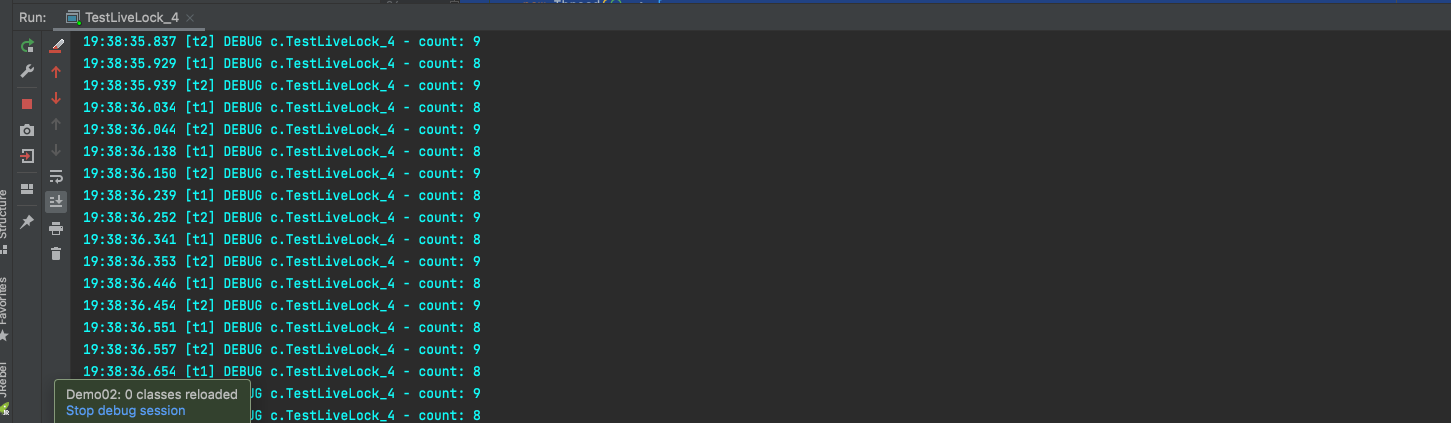
运行结果, 一直交替打印 都不结束。因为互相在改变对方的结束条件。

活锁运行结果

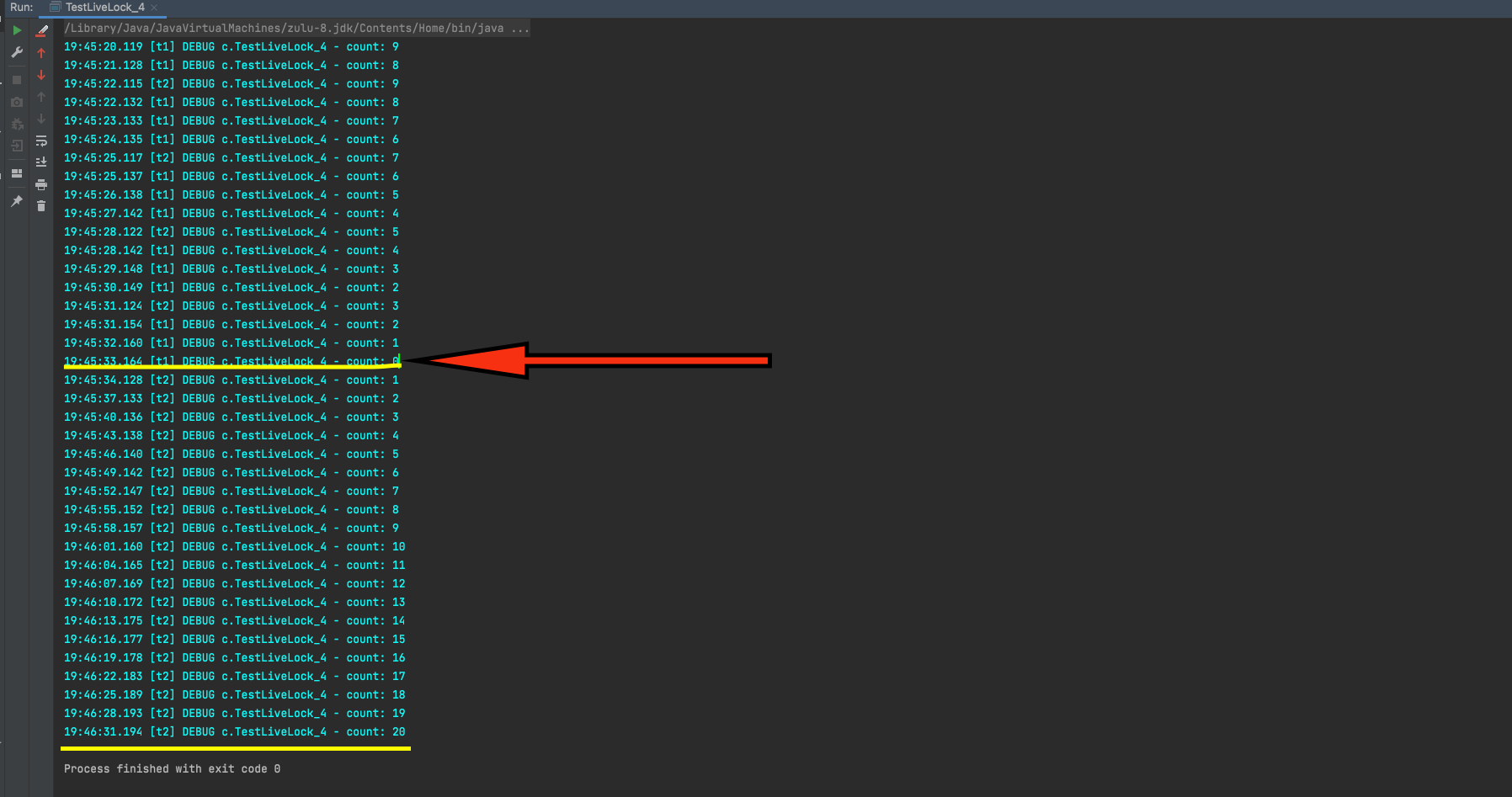
解决活锁问题的方法是尽量将两个线程执行时间错开, 比如线程一睡眠1秒, 而线程二睡眠3秒。 即将上述代码中的两行sleep分别改成:

Sleeper.sleep(1_000);Sleeper.sleep(3_000); 当然, 睡眠时长可以根据具体业务场景进行优化。

重新执行发现:

活锁解决验证

饥饿

产生原因

饥饿是指的线程无法获取到它执行所需要的资源,可以分为两种情况:

  1. 一种其他的线程在临界区做了无限循环或无限制等待资源的操作,让其他的线程一直不能拿到锁进入临界区,对其他线程来说,就进入了饥饿状态。

  2. 另一种是因为线程优先级不合理的分配,导致部分线程始终无法获取到CPU资源而一直无法执行。

    要解决饥饿的问题,要避免在Java中修改线程的优先级,并且在存在线程竞争的那部分代码,要完善释放资源的条件,不能让一个线程一直占有资源。

分析

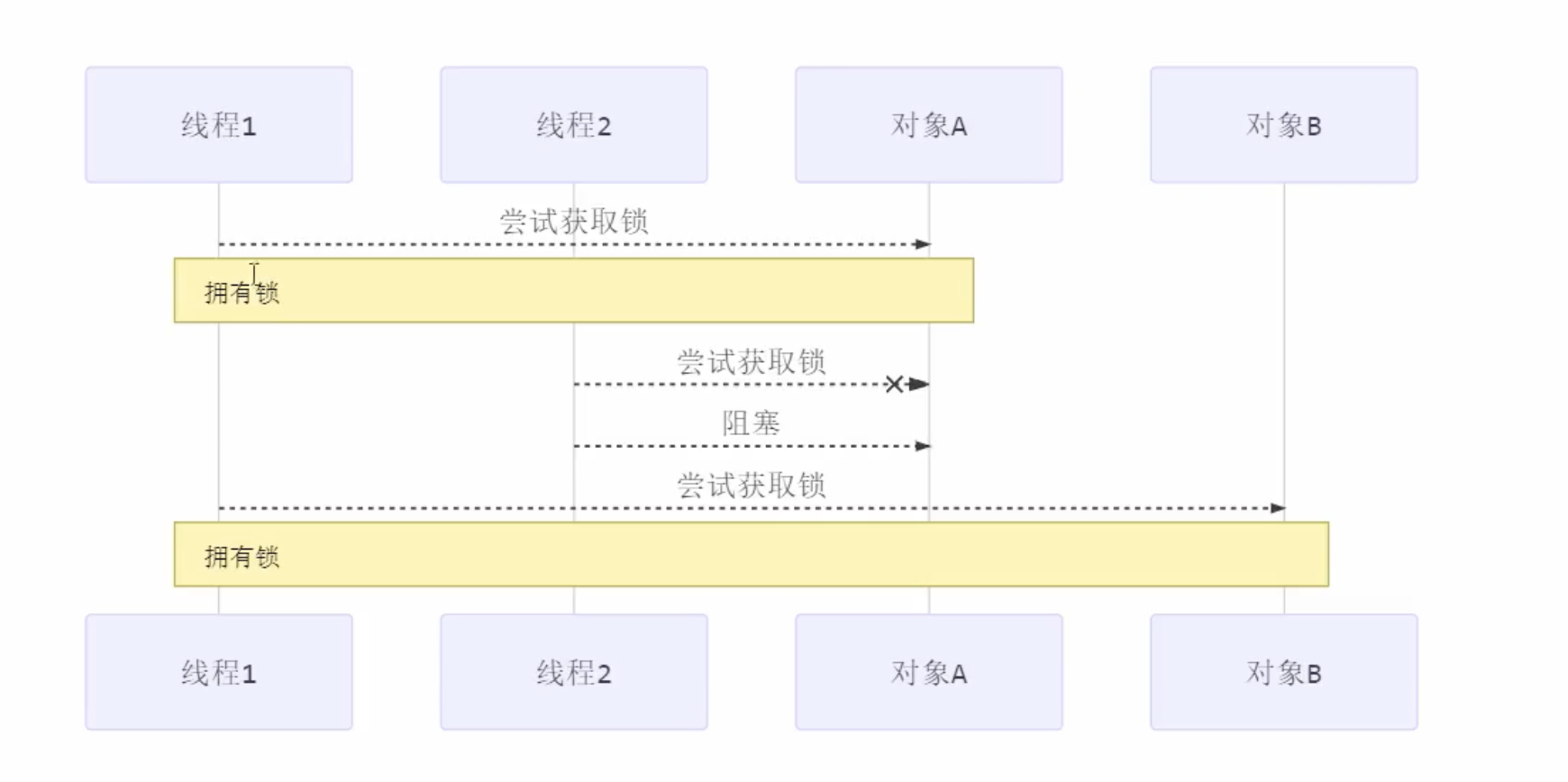
1A2B获取锁

如果使用顺序获取锁的方式:

顺序加锁

上述代码演示,还是哲学家就餐问题, 只是将最后一个哲学家改成:

1
new Philosopher("阿基米德", c1, c5).start();

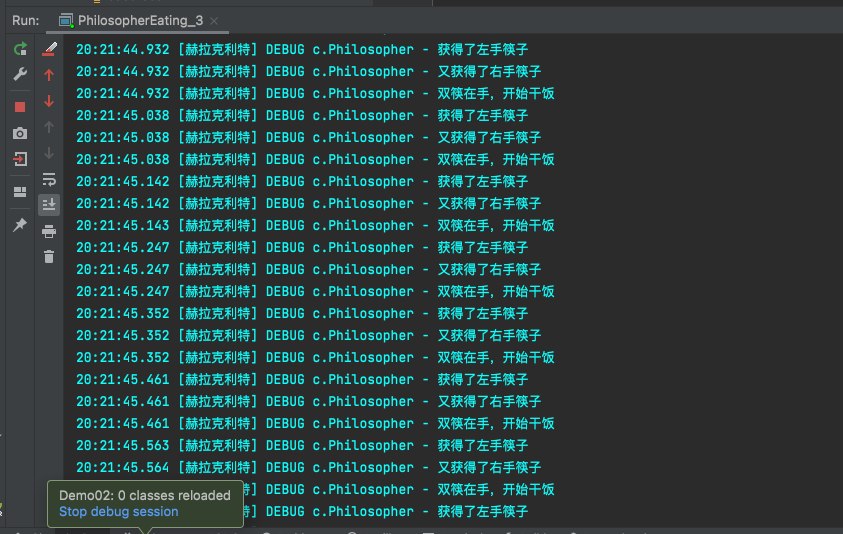
运行结果:发现程序不会有死锁了, 但是产生了饥饿现象。就是其中一个线程获取锁的资格的机会很大(如:赫拉克利特),而有的线程获取锁资格的机会很小(阿基米德)。

顺序获取锁

注意⚠️:死锁和饥饿都可以由下一章即将讲解的ReentrantLock解决。

-------------本文结束感谢您的阅读-------------