Spring-Security-6-MyBatis | Eloise's Paradise
0%

Spring-Security-6-MyBatis

之前的章节介绍过用JPA进行数据交互存储用户数据信息,今天将介绍如何使用MyBatis作为持久层框架搭配Spring Security进行用户校验。
原理和之前JPA的一致。

环境准备

建库建表(并插入用户数据用于后续测试)

1
2
3
4
5
6
7
8
9
10
11
12
13
14
15
16
17
18
19
20
21
22
23
24
25
26
27
28
29
30
31
32
33
34
35
36
37
38
39
40
41
42
43
44
45
46
create database if not exists springsecurityMybatis;
use springsecurityMybatis;

create table if not exists client(
`id` bigint NOT NULL AUTO_INCREMENT,
`name` varchar(255) DEFAULT NULL,
`phone`varchar(255) DEFAULT NULL,
`telephone`varchar(255) DEFAULT NULL,
`address`varchar(255) DEFAULT NULL,
`userface`varchar(255) DEFAULT NULL,
`remarks`varchar(255) DEFAULT NULL,
`account_non_expired` bit(1) NOT NULL DEFAULT 1,
`account_non_locked` bit(1) NOT NULL DEFAULT 1,
`credentials_non_expired` bit(1) NOT NULL DEFAULT 1,
`enable` bit(1) NOT NULL DEFAULT 1,
`password` varchar(255) DEFAULT NULL,
`username` varchar(255) DEFAULT NULL,
PRIMARY KEY (`id`)
)ENGINE=InnoDB DEFAULT CHARSET=utf8mb4 COLLATE=utf8mb4_0900_ai_ci;
create table if not exists cos(
`id` bigint NOT NULL AUTO_INCREMENT,
`name` varchar(255) DEFAULT NULL,
`name_zh` varchar(255) DEFAULT NULL,
PRIMARY KEY (`id`)
)ENGINE=InnoDB DEFAULT CHARSET=utf8mb4 COLLATE=utf8mb4_0900_ai_ci;

create table if not exists client_cos_relation(
`id` bigint NOT NULL AUTO_INCREMENT,
`client_id` bigint NOT NULL,
`cos_id` bigint NOT NULL ,
PRIMARY KEY (`id`)
)ENGINE=InnoDB DEFAULT CHARSET=utf8mb4 COLLATE=utf8mb4_0900_ai_ci;
-- 插入数据
-- 用户优先级/权限 由大到小 (super > admin > user > guest)
insert into client_cos_relation (id,client_id,cos_id) values
(1,1,1),(2,1,2),(3,1,3),(4,1,4)
,(5,2,2),(6,2,3),(7,2,4)
,(8,3,3),(9,3,4)
,(10,4,4);
insert into client
(name, phone, telephone, address, userface, remarks, account_non_expired, account_non_locked, credentials_non_expired, enable, password, username)
values
('Benedict','123','020-123','Manchester','face1','haha',1,1,1,1,'111','Benedict')
,('本尼迪克特','123','021-123','曼彻斯特','face2','hehe',1,1,1,1,'111','本尼迪克特')
,('卷福','123','027-123','曼城','face3','呵呵',1,1,1,1,'111','卷福');
insert into cos (id, name, name_zh) VALUES (1, 'super','超级管理员'),(2,'admin','管理员'),(3,'user','普通用户'),(4,'guest','访客');

建实体类

1
2
3
4
5
6
7
8
9
10
11
12
13
14
15
16
17
18
19
20
21
22
23
24
25
26
27
28
29
30
31
32
33
34
35
36
37
38
39
40
41
42
43
44
45
46
47
48
49
50
51
52
53
54
55
56
57
58
59
60
61
62
63
64
65
66
67
68
69
70
71
72
73
74
75
76
77
78
79
80
81
82
83
84
85
86
87
88
89
90
91
92
93
94
95
96
97
98
99
100
101
102
103
104
105
106
107
108
109
110
111
112
113
114
115
116
117
118
119
120
121
122
123
124
125
126
127
128
129
130
131
132
133
134
135
136
137
138
139
140
141
142
143
144
145
146
147
148
149
150
151
152
153
154
155
156
157
158
159
160
161
162
163
164
165
166
167
168
169
170
171
172
173
174
175
176
177
178
179
180
181
182
183
package org.example.model;

import com.fasterxml.jackson.annotation.JsonIgnore;
import org.springframework.security.core.GrantedAuthority;
import org.springframework.security.core.authority.SimpleGrantedAuthority;
import org.springframework.security.core.userdetails.UserDetails;

import java.util.ArrayList;
import java.util.Collection;
import java.util.List;

/**
* @author Joshua.H.Brooks
* @description
* 用来演示使用Mybatis作为持久层框架的例子中的实体类(等价于原来整合JPA例子中的User类)
* 注意: 除了UserDetails里是必须的,其他都是用户可以自己定义添加的
* @date 2022-07-05 10:32
*/
public class Client implements UserDetails {
/**
* 主键id
*/
private Long id;
/**
* 用户拥有的角色
*/
List<Cos> coses;
/**
* username used to authenticate the user. Cannot be <code>null</code>.
*/
private String username;
/**
* password used to authenticate the user.
*/
private String password;
/**
* Indicates whether the user's account has expired. An expired account cannot be
* authenticated.
*/
private boolean accountNonExpired;
/**
* Indicates whether the user is locked or unlocked. A locked user cannot be
* authenticated.
*/
private boolean accountNonLocked;

/**
* Indicates whether the user's credentials (password) has expired. Expired
* credentials prevent authentication.
*/
private boolean credentialsNonExpired;
/**
* Indicates whether the user is enabled or disabled. A disabled user cannot be
* authenticated.
*/
private boolean enable;

private String name;
private String phone;
private String telephone;
private String address;
private String userface;
private String remarks;

@Override
public String getUsername() {
return username;
}

@Override
public String getPassword() {
return password;
}
@Override
public boolean isAccountNonExpired(){
return this.accountNonExpired;
}
@Override
public boolean isAccountNonLocked(){
return this.accountNonLocked;
}
@Override
public boolean isCredentialsNonExpired(){
return this.credentialsNonExpired;
}
@Override
public boolean isEnabled(){
return this.enable;
}

public Long getId() {
return id;
}

public List<Cos> getCoses() {
return coses;
}

public boolean isEnable() {
return enable;
}
@Override
@JsonIgnore
public Collection<? extends GrantedAuthority> getAuthorities(){
List<SimpleGrantedAuthority> authorities = new ArrayList<>();
for (Cos cos:getCoses()) {
authorities.add(new SimpleGrantedAuthority(cos.getName()));
}
return authorities;
}

public String getName() {
return name;
}

public void setName(String name) {
this.name = name;
}

public String getPhone() {
return phone;
}

public void setPhone(String phone) {
this.phone = phone;
}

public String getTelephone() {
return telephone;
}

public void setTelephone(String telephone) {
this.telephone = telephone;
}

public String getAddress() {
return address;
}

public void setAddress(String address) {
this.address = address;
}

public String getUserface() {
return userface;
}

public void setUserface(String userface) {
this.userface = userface;
}

public String getRemarks() {
return remarks;
}

public void setRemarks(String remarks) {
this.remarks = remarks;
}

public void setCoses(List<Cos> coses) {
this.coses = coses;
}

@Override
public String toString() {
return "Client{" +
"id=" + id +
", coses=" + coses +
", username='" + username + '\'' +
", password='" + password + '\'' +
", accountNonExpired=" + accountNonExpired +
", accountNonLocked=" + accountNonLocked +
", credentialsNonExpired=" + credentialsNonExpired +
", enable=" + enable +
", name='" + name + '\'' +
", phone='" + phone + '\'' +
", telephone='" + telephone + '\'' +
", address='" + address + '\'' +
", userface='" + userface + '\'' +
", remarks='" + remarks + '\'' +
'}';
}
}

建Dao Service

1
2
3
4
@Repository
public interface CosMapper {
public List<Cos> loadCosesByUid(@Param("clientId") Long cid);
}
1
2
3
4
@Repository
public interface ClientMapper {
public Client loadUserByUsername(@Param("username") String username);
}

建Service

1
2
3
4
5
6
7
8
9
10
11
12
13
14
15
16
17
18
19
20
21
22
23
24
25
26
27
28
29
30
31
32
33
34
35
36
37
38
39
package org.example.service;

import org.example.dao.ClientMapper;
import org.example.dao.CosMapper;
import org.example.model.Client;
import org.example.model.Cos;
import org.springframework.security.core.userdetails.UserDetails;
import org.springframework.security.core.userdetails.UserDetailsService;
import org.springframework.security.core.userdetails.UsernameNotFoundException;
import org.springframework.stereotype.Service;

import javax.annotation.Resource;
import java.util.List;

/**
* @author Joshua.H.Brooks
* @description
* @date 2022-07-05 11:12
*/
@Service
public class ClientService implements UserDetailsService {
@Resource
ClientMapper clientMapper;
@Resource
CosMapper cosMapper;
@Override
public UserDetails loadUserByUsername(String username) throws UsernameNotFoundException {
Client client = clientMapper.loadUserByUsername(username);
System.out.println("查询到的 client = " + client);
if(client == null){
throw new UsernameNotFoundException("当前用户名不存在: "+username);
}
System.out.println("其具有的角色权限如下");
List<Cos> coses = cosMapper.loadCosesByUid(client.getId());
client.setCoses(coses);
coses.stream().forEach(System.out::println);
return client;
}
}

修改SecurityConfig#configure(httpSecurity)

注意⚠️: 要将原来持久化令牌方案解决记住我功能时的相关配置注释掉, 如果保留就要响应做好建表或者开启首次
这里直接注释掉了

1
2
3
4
5
6
7
8
9
10
11
12
13
14
15
16
17
18
19
20
21
22
23
24
25
26
27
28
// 注释掉使用持久化令牌的配置
//.tokenRepository(jdbcTokenRepository())
// 注释掉jdbcTokenRepository bean
// @Bean
// JdbcTokenRepositoryImpl jdbcTokenRepository() {
// JdbcTokenRepositoryImpl jdbcTokenRepository = new JdbcTokenRepositoryImpl();
// jdbcTokenRepository.setDataSource(dataSource);
// //只能执行一次 之后再执行会报错 Table 'persistent_logins' already exists
// jdbcTokenRepository.setCreateTableOnStartup(true); //会执行建表脚本,具体可见JdbcTokenRepositoryImpl#initDao()方法
// return jdbcTokenRepository;
// }

//添加了super角色继承关系
@Bean
RoleHierarchy roleHierarchy() {
RoleHierarchyImpl hierarchy = new RoleHierarchyImpl();
hierarchy.setHierarchy("ROLE_super > ROLE_admin > ROLE_user > ROLE_guest");
return hierarchy;
}

// 注入clientService 并关联使用这个service做authentication
@Autowired
ClientService clientService;
@Override
protected void configure(AuthenticationManagerBuilder auth) throws Exception {
auth.userDetailsService(clientService);
//auth.userDetailsService(userService);
}

测试

登陆

启动项目 访问登陆页面:http://localhost:9999/login.html
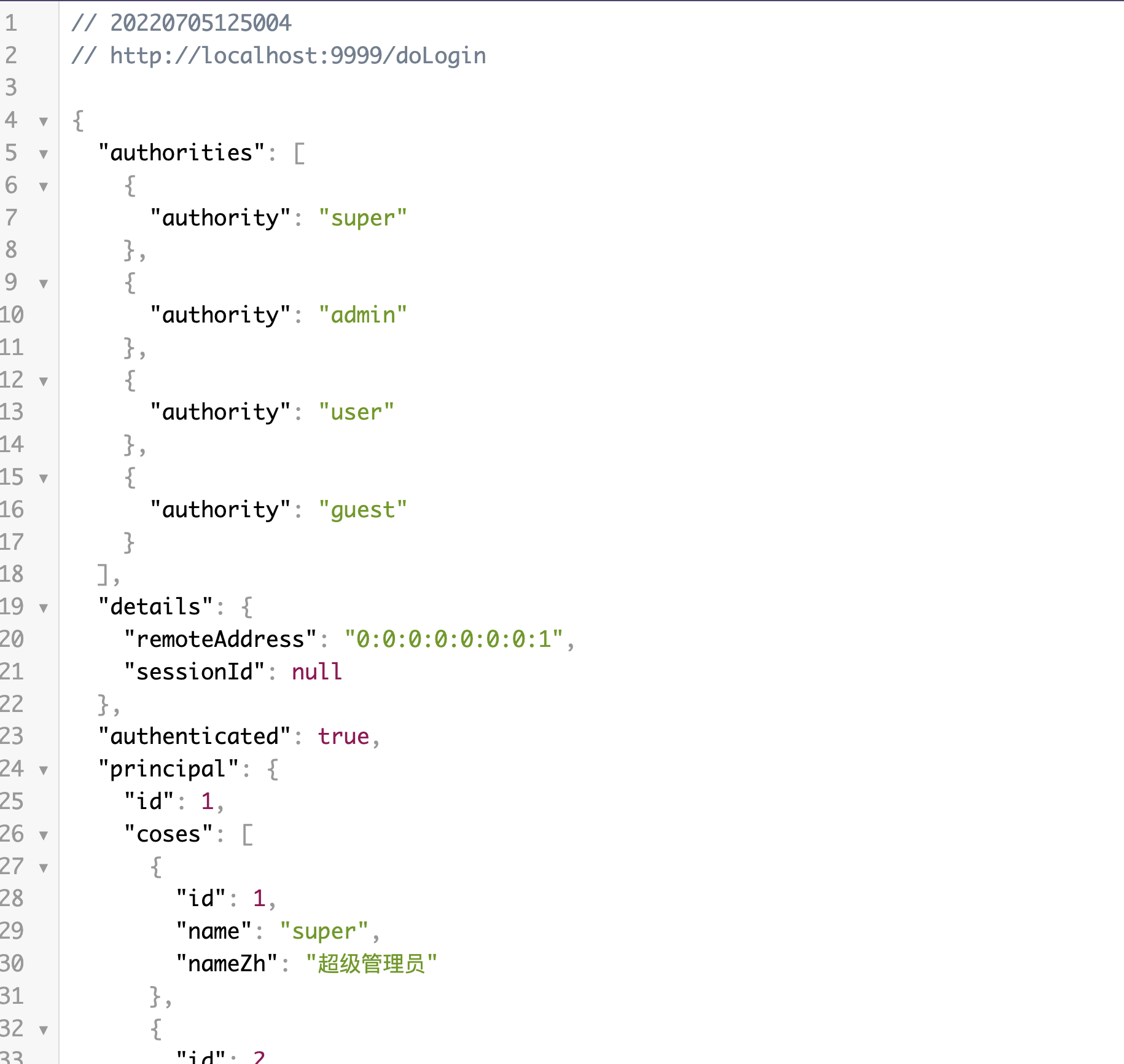
使用Benedict用户(具有超级管理员角色,四个权限都有) 登陆,发现返回JSON如下

1
2
3
4
5
6
7
8
9
10
11
12
13
14
15
16
17
18
19
20
21
22
23
24
25
26
27
28
29
30
31
32
33
34
35
36
37
38
39
40
41
42
43
44
45
46
47
48
49
50
51
52
53
54
55
56
57
58
59
60
61
{
"authorities": [
{
"authority": "super"
},
{
"authority": "admin"
},
{
"authority": "user"
},
{
"authority": "guest"
}
],
"details": {
"remoteAddress": "0:0:0:0:0:0:0:1",
"sessionId": null
},
"authenticated": true,
"principal": {
"id": 1,
"coses": [
{
"id": 1,
"name": "super",
"nameZh": "超级管理员"
},
{
"id": 2,
"name": "admin",
"nameZh": "管理员"
},
{
"id": 3,
"name": "user",
"nameZh": "普通用户"
},
{
"id": 4,
"name": "guest",
"nameZh": "访客"
}
],
"username": "Benedict",
"password": "111",
"accountNonExpired": true,
"accountNonLocked": true,
"credentialsNonExpired": true,
"enable": true,
"name": "Benedict",
"phone": "123",
"telephone": "020-123",
"address": "Manchester",
"userface": "face1",
"remarks": "haha",
"enabled": true
},
"credentials": null,
"name": "Benedict"
}

登陆成功JSON

访问hello等4个接口

发现只能访问 /hello接口, 其他三个都返回403 说明权限有问题。仔细观察上面返回的JSON数据中角色并没有像之前JPA中的”ROLE_”前缀
即使在SecurityConfig#roleHierarchy()加了:

1
hierarchy.setHierarchy("super > admin > user > guest");

重启项目, 角色权限继承依然没有生效。

这个问题的解决待到后续文章处理。

TODO MyBatis实现角色权限继承

-------------本文结束感谢您的阅读-------------