[Spring Security] 这么麻烦,不如自己写一个 Filter 拦截请求,简单实用。
自己写当然也可以实现,但是大部分情况下,大家都不是专业的 Web 安全工程师,所以考虑问题也不过就是认证和授权,这两个问题处理好了,似乎系统就很安全了。
其实不是这样的!
各种各样的 Web 攻击每天都在发生,什么固定会话攻击、csrf 攻击等等,如果不了解这些攻击,那么做出来的系统肯定也不能防御这些攻击。
使用 Spring Security 的好处就是,即使不了解这些攻击,也不用担心这些攻击,因为 Spring Security 已经帮你做好防御工作了。
我们常说相比于 Shiro,Spring Security 更加重量级,重量级有重量级的好处,比如功能全,安全管理更加完备。用了 Spring Security,你都不知道自己的系统有多安全!
本篇文章就来和大家聊一聊 Spring Security 中为常见的攻击所做的一些安全防御机制自带的防火墙机制。
自带防火墙
防火墙体系
[Spring Security] 中自带的防火墙机制是由接口 HttpFirewall和他的实现子类(如下图)实现相关防护功能的. 看名字就知道这是一个请求防火墙,它可以自动处理掉一些非法请求。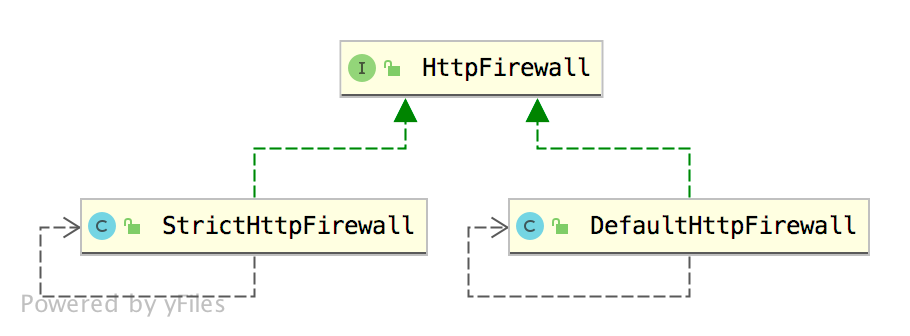
- DefaultHttpFirewall 的限制相对于 StrictHttpFirewall 要宽松一些,当然也意味着安全性不如 StrictHttpFirewall。
- Spring Security 中默认使用的是 StrictHttpFirewall。
防火墙防护措施
那么 StrictHttpFirewall 都是从哪些方面来保护我们的应用呢?我们来挨个看下。白名单
首先,对于请求的方法,只允许白名单中的方法,也就是说,不是所有的 HTTP 请求方法都可以执行。 这点我们可以从 StrictHttpFirewall 的源码中看出来:从这段代码中我们看出来,你的 HTTP 请求方法必须是 DELETE、GET、HEAD、OPTIONS、PATCH、POST 以及 PUT 中的一个,请求才能发送成功,否则的话,就会抛出 RequestRejectedException 异常。1
2
3
4
5
6
7
8
9
10
11
12
13
14
15
16
17
18
19
20
21
22
23
24
25public class StrictHttpFirewall implements HttpFirewall {
private Set<String> allowedHttpMethods = createDefaultAllowedHttpMethods();
private static Set<String> createDefaultAllowedHttpMethods() {
Set<String> result = new HashSet<>();
result.add(HttpMethod.DELETE.name());
result.add(HttpMethod.GET.name());
result.add(HttpMethod.HEAD.name());
result.add(HttpMethod.OPTIONS.name());
result.add(HttpMethod.PATCH.name());
result.add(HttpMethod.POST.name());
result.add(HttpMethod.PUT.name());
return result;
}
private void rejectForbiddenHttpMethod(HttpServletRequest request) {
if (this.allowedHttpMethods == ALLOW_ANY_HTTP_METHOD) {
return;
}
if (!this.allowedHttpMethods.contains(request.getMethod())) {
throw new RequestRejectedException("The request was rejected because the HTTP method \"" +
request.getMethod() +
"\" was not included within the whitelist " +
this.allowedHttpMethods);
}
}
}
那如果你想发送其他 HTTP 请求方法,例如 TRACE ,该怎么办呢?我们只需要自己重新提供一个 StrictHttpFirewall 实例即可,如下:当然能够定制的地方还很多, 可以在两个实现类1
2
3
4
5
6
HttpFirewall httpFirewall() {
StrictHttpFirewall firewall = new StrictHttpFirewall();
firewall.setUnsafeAllowAnyHttpMethod(true);
return firewall;
}StrictHttpFirewall和DefaultHttpFirewall中看具体的配置项.请求地址不能有分号
使用Shiro 的时候,如果禁用了 Cookie,那么JSESSIONID就会出现在地址栏里,像下面这样:http://localhost:8888/hi;JSESSIONID=89CCC246EB2C567BFBC781547C00315D
这种传递 JSESSIONID 的方式实际上是非常不安全的,所以在 Spring Security 中,这种传参方式默认禁用了。
如果你使用了 Spring Security,请求地址是不能有 ; 的,如果请求地址有 ; ,就会自动跳转到如下页面: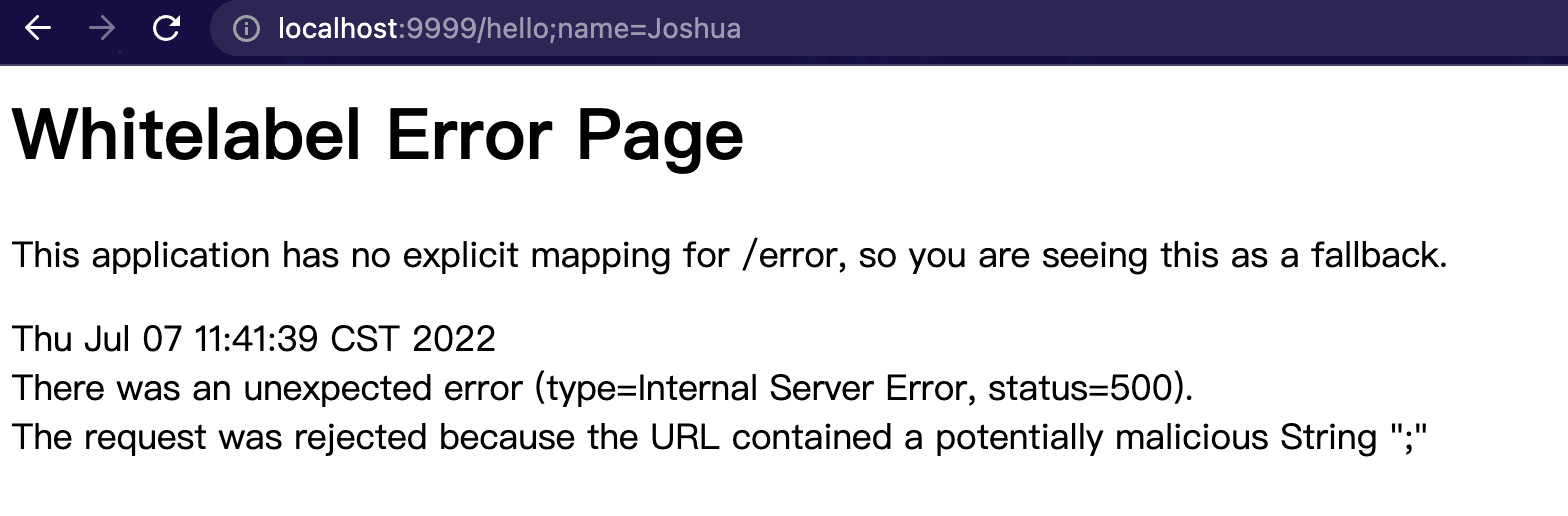

当然,如果特殊业务场景你希望地址栏能够被允许出现 ; ,那么同样在注入的定制 **HttpFirewall bean**里加入允许分号的配置行:
1 | firewall.setAllowSemicolon(true); |
重启再访问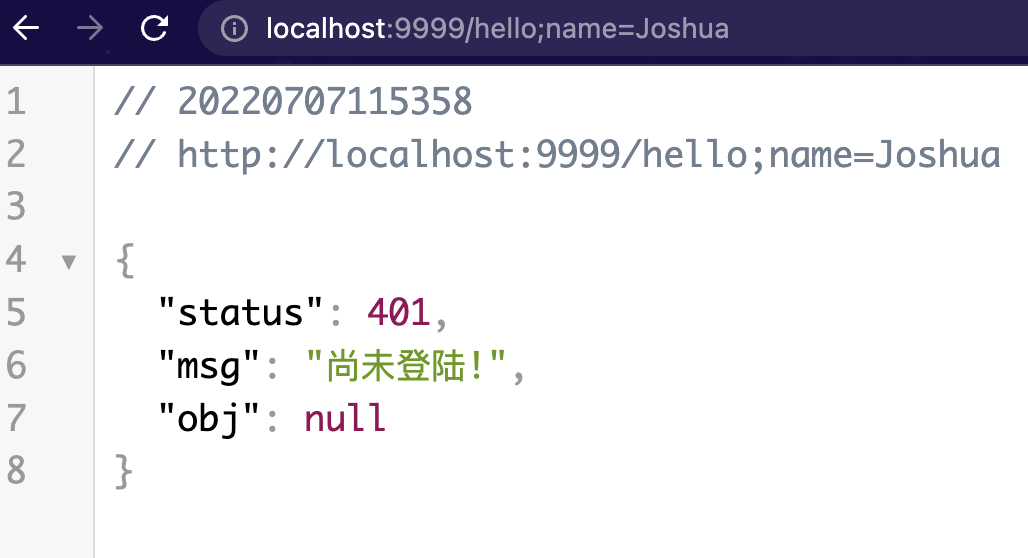
可以看见此时已经不再报之前不允许分号的错.
注意⚠️:
- 之所以是401是因为测试demo是在之前的基础上做的. 也就是之前文章配置的
authenticationEntryPoint处理未授权访问生效中.如果没有配置这个会报错404. - 注意,在 URL 地址中,; 编码之后是 %3b 或者 %3B,所以地址中同样不能出现 %3b 或者 %3B
题外话, 上面说的特殊业务场景希望地址栏能够被允许出现 ; 在SpringMVC中使用@MatrixVariable注解就是这样特殊的场景.
新建/hello/id
1 | (value = "/hello/{id}") |
配置MVC不要自动移除 ; ,
1 |
|
项目也已经配置了Spring Security 中允许 URL 中存在 ; ,
1 | firewall.setAllowSemicolon(true); |
记得在SecurityConfig#configure(httpsession)中配置放行
1 | .antMatchers("/hi/**").permitAll() |
重启项目测试http://localhost:9999/hi/123;name=Joshua
返回结果如下, 说明Spring Security配合使用@MatrixVariable注解允许URL路径中使用分号 ;的配置生效了

[Spring Security] 默认情况下除了禁止分号出现在URL中外, 还有其他特殊符号也不允许.
1 | public StrictHttpFirewall() { |
当然默认的也可以被打开,通过添加如下配置即可:
1 | /** |
注意⚠️:
- 要区分是加入encodedUrlBlacklist还是decodedUrlBlacklist
urlBlacklistsAddAll 是向 this.encodedUrlBlacklist 和 this.decodedUrlBlacklist 都加入, 源码如下: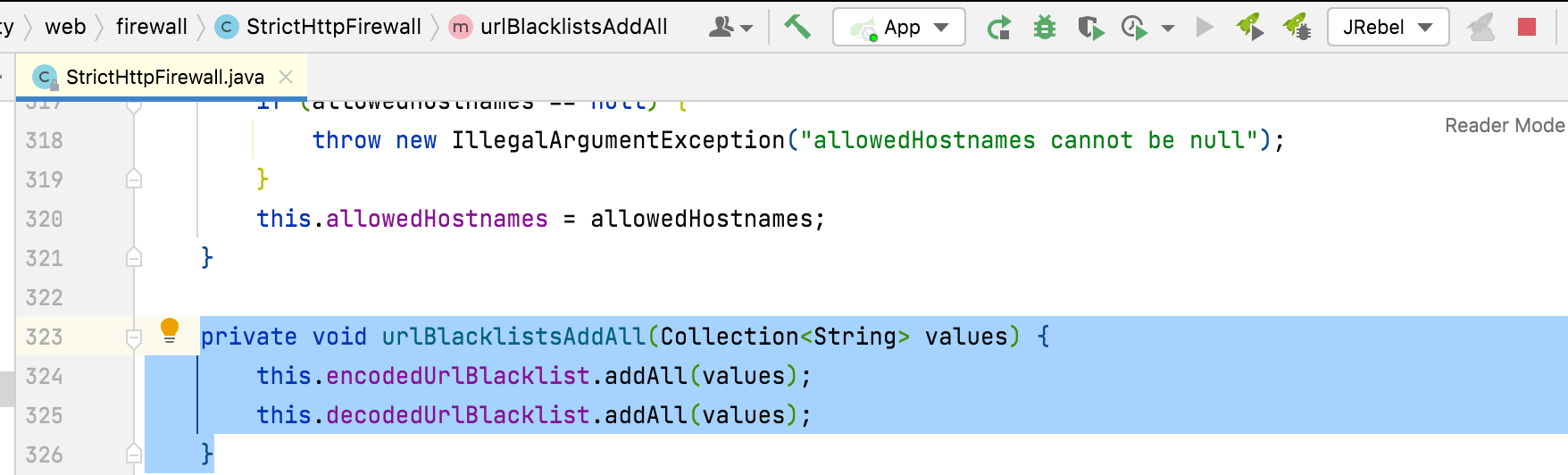
- 上面所说的这些限制,都是针对请求的
requestURI进行的限制,而不是针对请求参数。例如你的请求格式是:http://localhost:9999/hi/123;name=Joshua%Hoffman%Brooks时, 即使是默认的配置不允许❌% 也可以正常访问. 相关源码如下:1
2
3
4
5
6
7
8
9
10
11
12
13
14
15
16
17
18
19
20
21
22
23
24
25
26
27
28
29
30
31
32
33
34
35
36
37
38
39
40
41
42
43
44
45
46
47
48
49
50
51
52
53public class StrictHttpFirewall implements HttpFirewall {
public FirewalledRequest getFirewalledRequest(HttpServletRequest request) throws RequestRejectedException {
rejectForbiddenHttpMethod(request);
rejectedBlacklistedUrls(request);
rejectedUntrustedHosts(request);
if (!isNormalized(request)) {
throw new RequestRejectedException("The request was rejected because the URL was not normalized.");
}
String requestUri = request.getRequestURI();
if (!containsOnlyPrintableAsciiCharacters(requestUri)) {
throw new RequestRejectedException("The requestURI was rejected because it can only contain printable ASCII characters.");
}
return new FirewalledRequest(request) {
public void reset() {
}
};
}
private void rejectedBlacklistedUrls(HttpServletRequest request) {
for (String forbidden : this.encodedUrlBlacklist) {
if (encodedUrlContains(request, forbidden)) {
throw new RequestRejectedException("The request was rejected because the URL contained a potentially malicious String \"" + forbidden + "\"");
}
}
for (String forbidden : this.decodedUrlBlacklist) {
if (decodedUrlContains(request, forbidden)) {
throw new RequestRejectedException("The request was rejected because the URL contained a potentially malicious String \"" + forbidden + "\"");
}
}
}
private static boolean encodedUrlContains(HttpServletRequest request, String value) {
if (valueContains(request.getContextPath(), value)) {
return true;
}
return valueContains(request.getRequestURI(), value);
}
private static boolean decodedUrlContains(HttpServletRequest request, String value) {
if (valueContains(request.getServletPath(), value)) {
return true;
}
if (valueContains(request.getPathInfo(), value)) {
return true;
}
return false;
}
private static boolean valueContains(String value, String contains) {
return value != null && value.contains(contains);
}
} - 虽然[Spring Security]开放了设置,可以让用户手动修改这些限制,但是不建议大家做任何修改,保持默认的即可(原因在上面的@Bean HttpFirewall httpFirewall()注释中有提到). 除非有特殊需求, 或者即使有特殊需求也要慎重考虑是否打开和对打开后的相关安全影响有全盘考虑后再做决定并一并提出对应的解决方案.
必须是标准化URL
标准化 URL 主要从四个方面来判断,我们来看下源码:
1 | private static boolean isNormalized(HttpServletRequest request) { |
- getRequestURI 就是获取请求协议之外的字符;
- getContextPath 是获取上下文路径,相当于是 project 的名字;
- getServletPath 这个就是请求的 servlet 路径,
- getPathInfo 则是除过 contextPath 和 servletPath 之后剩余的部分。
这四种路径中,都不能包含如下字符串:
"./", "/../" or "/."
会话固定攻击
[Spring-Security] 系列文章的[第8篇] 我们聊了 Spring Security 中的 session 并发问题,实现了如何像 QQ 一样,用户在一台设备上登录成功之后,就会自动踢掉另一台设备上的登录的功能。
当然,Spring Security 中,关于 session 的功能不仅仅是这些,还有各种各样的对常见网络攻击提供相应的防御策略,本节就来看看:什么是会话固定攻击以及 Spring Security 中如何防止会话固定攻击。
了解HttpSession
讲会话固定攻击之前,先来了解下 HttpSession。
HttpSession 是一个服务端的概念,服务端生成的 HttpSession 都会有一个对应的 sessionid,这个 sessionid 会通过 cookie 传递给前端,前端以后发送请求的时候,就带上这个 sessionid 参数,服务端看到这个 sessionid 就会把这个前端请求和服务端的某一个 HttpSession 对应起来,形成“会话”的感觉。
浏览器关闭并不会导致服务端的 HttpSession 失效,想让服务端的 HttpSession 失效,要么手动调用 HttpSession#invalidate 方法;要么等到 session 自动过期;要么重启服务端。
但是为什么有的人会感觉浏览器关闭之后 session 就失效了呢?这是因为浏览器关闭之后,保存在浏览器里边的 sessionid 就丢了(默认情况下),所以当浏览器再次访问服务端的时候,服务端会给浏览器重新分配一个 sessionid ,这个 sessionid 和之前的 HttpSession 对应不上,所以用户就会感觉 session 失效。
注意前面我用了一个默认情况下,也就是说,我们可以通过手动配置,让浏览器重启之后 sessionid 不丢失,但是这样会带来安全隐患,所以一般不建议。
以 Spring Boot 为例,服务端生成 sessionid 之后,返回给前端的响应头是这样的: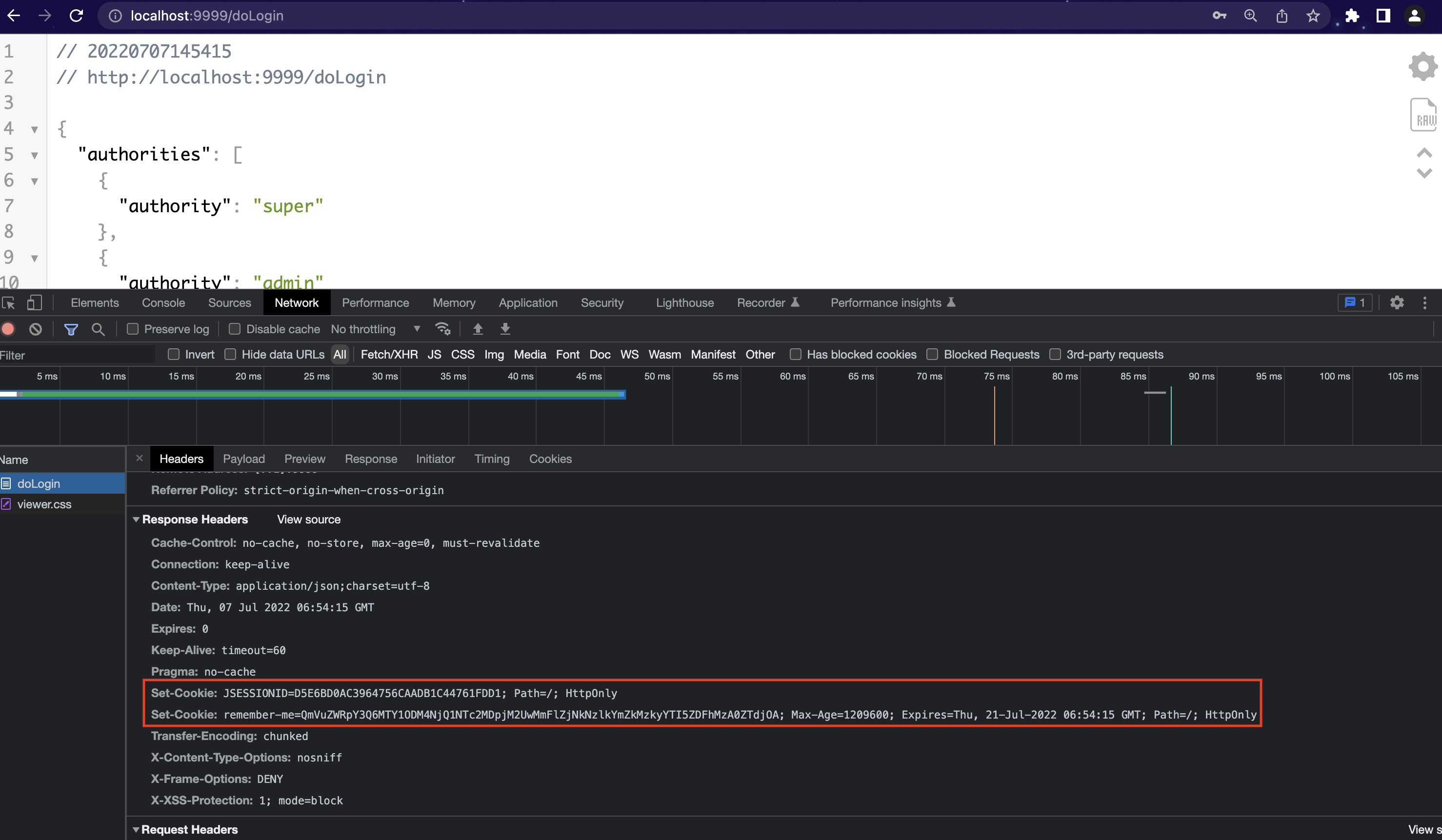
在服务端的响应头中有一个Set-Cookie字段,该字段指示浏览器更新 sessionid,同时大家注意还有一个 HttpOnly 属性,这个表示通过 JS 脚本无法读取到 Cookie 信息,这样能有效的防止 XSS 攻击。
下一次浏览器再去发送请求的时候,就会自觉的携带上这个 JSESSIONID 了: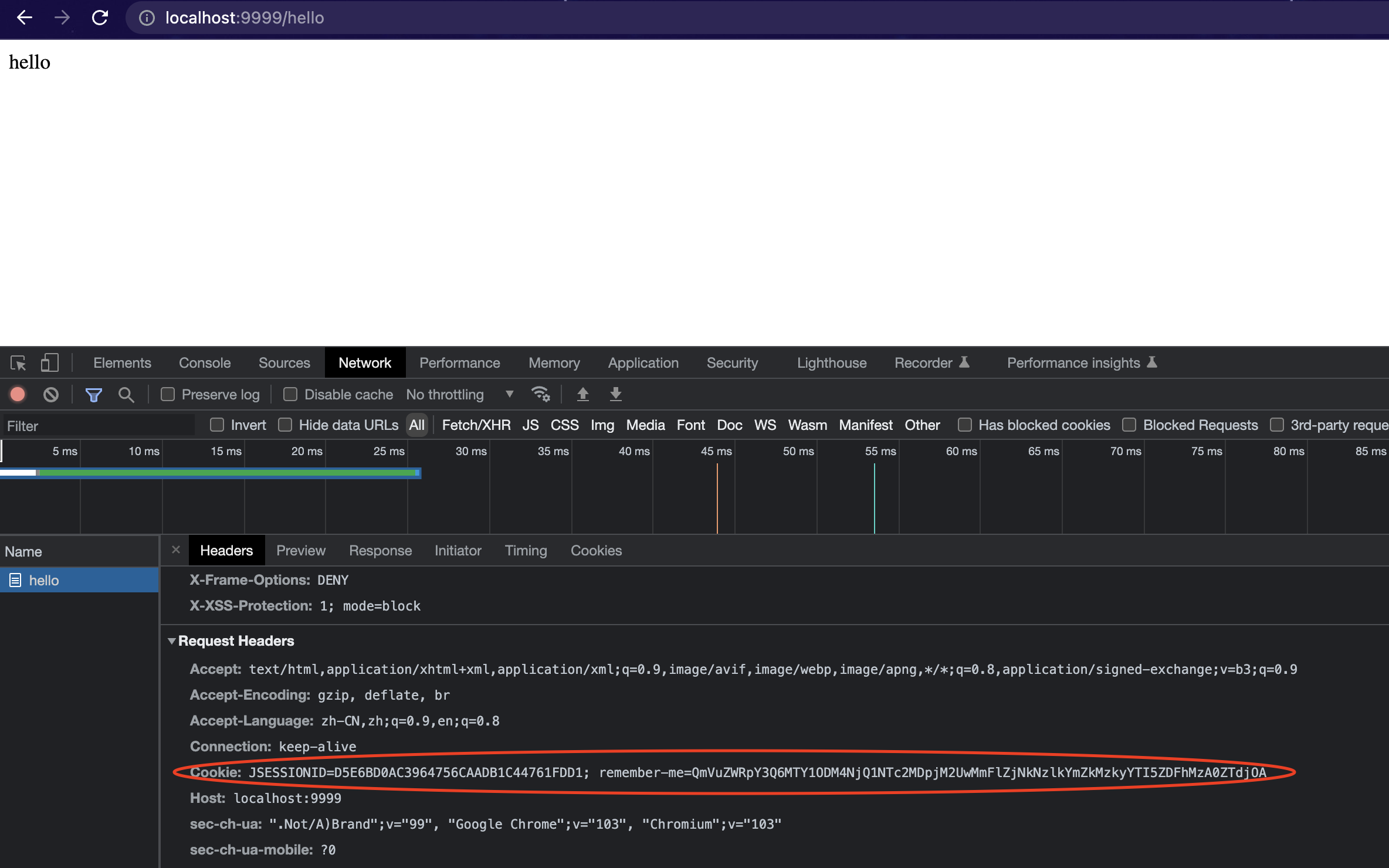
引入(会话固定攻击)SFA
会话固定攻击 英文叫做 Session Fixation Attack.
正常来说,只要你不关闭浏览器,并且服务端的 HttpSession 也没有过期,那么维系服务端和浏览器的 sessionid 是不会发生变化的,而会话固定攻击,则是利用这一机制,借助受害者用相同的会话 ID 获取认证和授权,然后利用该会话 ID 劫持受害者的会话以成功冒充受害者,造成会话固定攻击。
一般来说,会话固定攻击的流程是这样,以淘宝为例:
攻击者自己可以正常访问淘宝网站,在访问的过程中,淘宝网站给攻击者分配了一个
sessionid。攻击者利用自己拿到的 sessionid 构造一个淘宝网站的链接,并把该链接发送给受害者。
受害者使用该链接登录淘宝网站(该链接中含有 sessionid),登录成功后,一个合法的会话就成功建立。
攻击者利用手里的 sessionid 冒充受害者。
在这个过程中,如果淘宝网站支持 URL 重写,那么攻击还会变得更加容易。
什么是 URL 重写?就是用户如果在浏览器中禁用了 cookie,那么 sessionid 自然也用不了了,所以有的服务端就支持把 sessionid 放在请求地址中:http://www.somesite.com;JSESSIONID=xxxxxx
如果服务端支持这种 URL 重写,那么对于攻击者来说,按照上面的攻击流程,构造一个这种地址简直太简单不过了。
不过这种请求地址大家在 Spring Security 中应该很少见到(原因请见下文),但是在 Shiro 中可能多多少少有见过如何防御SFA
这个问题的根源在 sessionid 不变,如果用户在未登录时拿到的是一个 sessionid,登录之后服务端给用户重新换一个 sessionid,就可以防止会话固定攻击了。
如果你使用了 Spring Security ,其实是不用担心这个问题的,因为 Spring Security 中默认已经做了防御工作了。
Spring Security 中的防御主要体现在三个方面:首先就是上一节讲的
StrictHttpFirewall,请求地址中有 ; 请求会被直接拒绝。另一方面就是响应的 Set-Cookie 字段中有
HttpOnly属性,这种方式避免了通过 XSS 攻击来获取 Cookie 中的会话信息进而达成会话固定攻击。第三点则是让 sessionid 变一下。既然问题是由于 sessionid 不变导致的,那我就让 sessionid 变一下。
具体配置如下:1
2
3
4
5
6.and()
.sessionManagement()
.sessionFixation()
.migrateSession()
.maximumSessions(1)
.maxSessionsPreventsLogin(true)如图:
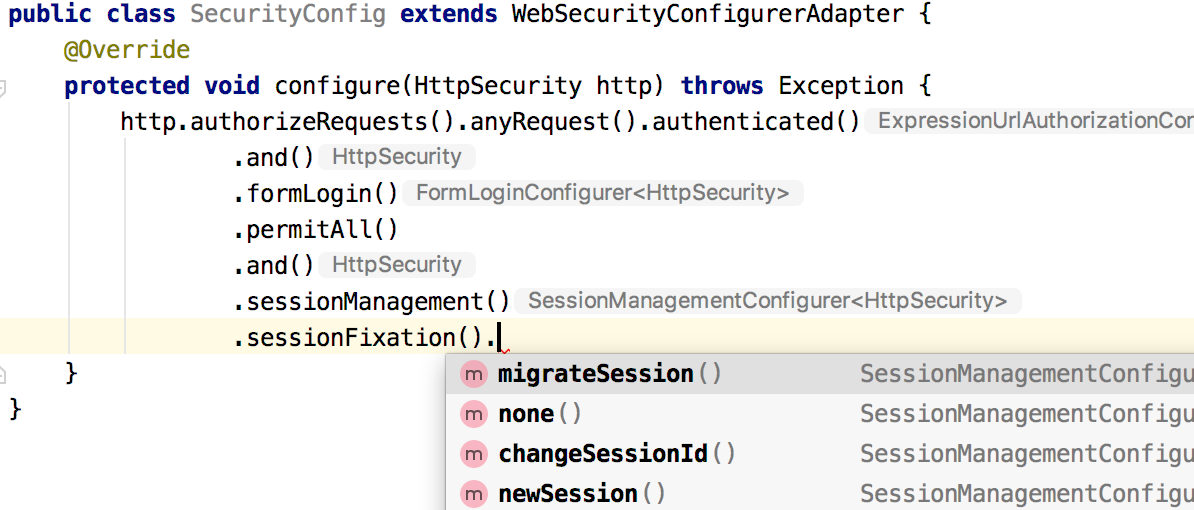
可以看到,在这里,我们有四个选项:
- migrateSession 表示在登录成功之后,创建一个新的会话,然后讲旧的 session 中的信息复制到新的 session 中,默认即此。
- none 表示不做任何事情,继续使用旧的 session。
- changeSessionId 表示 session 不变,但是会修改 sessionid,这实际上用到了 Servlet 容器提供的防御会话固定攻击。
- newSession 表示登录后创建一个新的 session。
默认的 migrateSession ,在用户匿名访问的时候是一个 sessionid,当用户成功登录之后,又是另外一个 sessionid,这样就可以有效避免会话固定攻击。
这种三方案,可以让我们有效避免会话固定攻击!
具体逻辑可参考org.springframework.security.config.annotation.web.configurers.SessionManagementConfigurer源码
1 | /**Specifies that a new session should be created and the session attributes from the original HttpSession should be retained.*/ |
说了这么多,大家发现,如果你使用了 Spring Security,其实你什么都不用做,因为Spring Security默认已经采用 如何防御SFA里提到的三点做了防御,Spring Security 之强大,可见一斑。